
Disclaimer: This post contains affiliate links. This means we may earn a commission should you choose to sign up for a program or make a purchase using these links. There is no added cost to you, but your purchase through these links helps support our content. Check out our disclaimer and disclosure page for more details.
Medical note: This is a buying guide, not medical advice. A chair cannot diagnose, treat, or cure back pain. If your pain persists, worsens, or comes with any of the warning signs listed below, talk to a healthcare professional.
How these picks were made: We did not physically test these chairs. We based our recommendations on manufacturer specifications, current store listings, and published editorial testing by other outlets. We explain exactly how we selected the Best Office Chair for Back Pain.
You move. You move again. By this point in the afternoon, you’re sitting on the edge of your seat because the backrest no longer supports you, and after every video call, you wince as you stand up.
That isn’t always caused by a chair. That being said, the chair is where you spend most of the day, so it’s a good place to start. This guide covers the best office chairs for back pain in a practical way. It covers chairs with proven, adjustable back support that you can customize to fit your body, priced between $369 and about $1,399.
Feel free to cut this short. The chair should work for you more than the brand name. To do this, you should be able to move the lumbar support to the right place and slide the seat to make it fit your thigh length. We also tell you where there isn’t much proof, because there isn’t much.
Short Answer: No single office chair is best for back pain, and none can promise to help. We found the Steelcase Leap to be the best option for back support, with the most adjustability. The Branch Ergonomic Chair Pro ($499) has a removable lumbar pad and height and depth adjustments. You can also adjust the seat depth. Fit and a real return window are more important than the name.
Start with our full office chair buying guide if you’re still unsure what features to look for. This article is more specific. It covers specific chairs, trade-offs, and questions about back support.
Quick Picks: Best Office Chairs for Back Pain
We chose five chairs priced from about $369 to $1,399 that offer lumbar support, adjustable seat height, and a weight limit set by the manufacturer. We didn’t pick an “overall winner” because the evidence doesn’t support the idea that one chair should work for everyone.
| Chair | Best for | Lumbar support | Key adjustments | Main advantage | Main limitation |
| Steelcase Leap | Adjustable lumbar support; long days | LiveBack flexing back + height-adjustable lumbar + lower-back firmness control | Seat width, seat height, 4D arms, recline, 400 lb limit | Most tunable back support on this list | Price; heavy (46.7 lb) |
| Herman Miller Aeron | Breathability; wide size range | Adjustable PostureFit SL (sacral + lumbar pads) | 3 sizes (A/B/C), tilt limiter + seat angle, arm options, 300–400 lb by size | Mesh stays cool; sizes cover 4’10″–6’6″ | Price; no seat-depth slider listed (you choose a size) |
| Steelcase Series 2 | Steelcase quality for far less | Height-adjustable lumbar on upholstered / 3D Microknit versions; not on the Air Back version | 4D arms, weight-activated recline, 400 lb limit | 12-year warranty at a “mid” price | Easy to order without adjustable lumbar; seat-depth slider not confirmed on the US page |
| Branch Ergonomic Chair Pro | Best adjustability under $500 | Padded, two-way (height + depth) adjustable lumbar; removable | Seat height + depth, forward tilt, tilt tension, 5D arms, 275 lb limit | 14 adjustments at $499 | 275 lb limit; assembly required |
| HON Ignition 2.0 | Lifetime warranty; seat glide in a mesh chair | Adjustable lumbar; four-way stretch mesh back | Synchro-tilt with seat glide, height/width arms, 300 lb limit | Limited lifetime warranty (12 years on mesh and controls per listing) | Price is hard to pin down; narrower usable seat depth (about 16–19.5″ by configuration) |
How We Selected These Office Chairs
What we did. No real-life testing was used to write this article. We didn’t sit in these chairs or say we measured anything. We reviewed manufacturer pages and spec sheets for Herman Miller, Branch, Steelcase, and HON that show sizes, adjustments, weight limits, warranty, and return policies.
- Help from OSHA and NIOSH/CDC on ergonomics to figure out what “supportive” means.
- Published editorial testing from places that test chairs in person (TechRadar’s published results for the Leap and Series 2 were used as examples).
- Medical sources, like the Mayo Clinic, and systematic reviews for claims about health.
We started with well-known options like the Steelcase Leap, Herman Miller Aeron, Branch Ergonomic Chair Pro, HON Ignition 2.0, and Steelcase Gesture. These were research candidates, not sure-fire winners. We didn’t include the Gesture because we weren’t sure of its current US price and specs. Instead, we added the Steelcase Series 2 and the Branch Ergonomic Chair to cover the middle and lower price ranges.
These ten things. The same list was used to check each chair:
- Design of the backrest and lumbar support
- Ability to change seat height and depth
- Lying down and moving around
- Armrests that can be adjusted
- Size and fit of the seat
- Breathability and the stuff
- Weight limit and fit advice from the manufacturer
- Return and warranty policy
- Price compared to useful features
- Available in the US
What we didn’t include. If we weren’t sure about a spec, we left it out or said so. We didn’t use customer star ratings to show the chairs helped with back pain; we didn’t assign chairs numbers; and we didn’t include any chairs whose lumbar support we couldn’t prove. This means no chair on this list costs less than $300. Read the budget section to find out why.
Best Office Chairs for Back Pain: Detailed Reviews
1. Steelcase Leap: Best for Adjustable Lumbar Support

An overview. Steelcase’s best task chair is the Leap. When we checked, Steelcase’s store page showed that a leather-upholstered configuration cost $2,167. A standard configuration, which was the Price before a TechRadar-reported sale, was listed at $1,376. The Price depends a lot on the options and upholstery.
Why it stands out. Steelcase calls the back “LiveBack,” and it’s made to bend as you move. Steelcase also lists height-adjustable lumbar support, plus seat width and adjustable armrests. Steelcase’s materials also mention a separate control for lower-back firmness. This lets you change both where the support sits and how much it pushes. TechRadar chose it as the best chair for back pain because of its two-part setting.
Pros:
- You can change the height and firmness of the lumbar support independently.
- You can adjust the seat width and 4D armrests.
- Can hold up to 400 pounds (Steelcase Store)
- Strong warranty (see Price and information on how to buy)
Cons:
- This chair costs the most when all the options are added.
- It weighs 46.7 pounds, which is a lot.
- For some people, the padded back and seat are warmer than the mesh ones.
- It takes a week or two to get it just right, and there are more ways to mess it up with more buttons.
Who should think about it? People who have more than $1,300 to spend, spend a lot of time sitting, and don’t have the “average” body shape for a chair. No one has ever tried a fixed-lumbar chair and had the support land in the wrong place.
Price and buying advice. The Steelcase Store. Steelcase’s regional literature says that the frame and structure are covered for a limited lifetime warranty, while the mechanisms are covered for 12 years. Before you order, check the Steelcase Store for the exact US terms and the return window.
The final word. The most customizable setup on this list, and the best choice for people who know a regular chair doesn’t fit them. There is a learning curve, Price, and weight to consider.
2. Herman Miller Aeron: Best for Breathability and Size Range

An overview. The Aeron is a famous mesh chair from Herman Miller. It cost $699 at the Herman Miller shop when we checked, and it came with a 12-year warranty and a 30-day return policy.
Why it stands out. With the Aeron, you can adjust seat depth by choosing from three sizes. Herman Miller’s advice on how to measure:
| Size | Recommended height | Weight guidance / capacity |
| A (small) | 4’10″–5’4″ | up to 300 lb |
| B (medium) | 5’2″–6’0″ | up to 350 lb |
| C (large) | 5’10″–6’6″ | up to 400 lb |
This back support has two pads that support the sacrum (the base of the spine) and the lumbar area. It’s called PostureFit SL. You must select “Adjustable PostureFit SL” and “Adjustable Lumbar Support” (which can be moved up and down 4.5 inches) when setting up the chair. The suspension mesh (8Z Pellicle) lets air flow through it.
Pros:
- Mesh on the back and seat to let air flow.
- People of many heights and weights can wear sizes A, B, and C.
- A tilt limiter that lets you choose the seat angle (up to 5° forward tilt).
- Warranty for 12 years
Cons:
- The type of back support you pick is important; the base back is a zonal mesh, not a changeable lumbar pad.
- The US page didn’t have a seat-depth slider, so it’s important to choose the right size.
- Not everyone likes mesh seats; some people prefer cushions.
- Price is also a significant factor.
Who should consider this? People in hot climates, those with smaller or larger body frames (sizes A and C), or anyone who wants a mesh chair with a long warranty.
Price and advice on how to buy. Herman Miller store in the US. When we checked, Herman Miller was offering a $500 discount code for orders over $2,000. Deals change all the time.
The final word. If you pick the right size and the adjustable back support option, this mattress has the best size range and the most airflow on this list.
3. Steelcase Series 2: Best Steelcase Value (With the Right Back Option)

An overview. Series 2 is Steelcase’s high-performance, low-cost chair. We found a Steelcase Store listing that said prices ranged from $650 to $800, depending on the configuration. The 12-year warranty was one reason TechRadar chose it as the best overall chair for price and performance. If your pain is more severe or specific, they suggested upgrading to the Leap.
Why it stands out. Steelcase says all upholstered and 3D Microknit models include a height-adjustable lumbar (two handles on the back), 4D arms, a weight-activated recline, and support up to 400 pounds.
Steelcase says the Series 2 with the Air Back doesn’t come with an adjustable back. If you want back support, choose a back with adjustable lumbar support.
Pros:
- The lumbar on the right versions can be adjusted
- Armrests in 4D
- Holds 400 pounds and comes with a 12-year protection
- Prices are much lower than Leap’s.
Cons:
- Simple to set up without the lumbar support you wanted
- Fewer controls for the lower back than the Leap (height controls only, not the Leap’s separate stiffness control).
Who should think about it? People who don’t want to pay Leap prices but still want Steelcase quality and a warranty.
Price and buying advice. The Steelcase Store. Check the cart total, the back type, and the lumbar option.
The final word. A good choice between the Branch and the Leap, as long as you get the version with an adjustable lumbar.
4. Branch Ergonomic Chair Pro: Best Adjustability Under $500

An overview. At $499, the Pro is Branch’s best chair. Branch’s page says it offers 14 adjustment points, a 7-year guarantee, and a 30-day return policy with a refund minus the cost of shipping the item back.
Why it stands out. It’s a padded pad that adjusts in two directions (height and depth) and can be fully removed. You can add 5D armrests, tilt and tilt tension, a forward tilt, and seat height and depth. Branch says it’s between 5’2” and 6’2” tall and weighs 275 lb. The spec sheet says the seat depth ranges from 16.7” to 19.7”. You can add a headrest for an extra $69 and a tall cylinder for an extra $29.
Pros:
- The lumbar can be moved in two directions and taken off if you don’t like it.
- Forward seat tilt for active sitting up straight
- Several materials, such as leather, mesh, bouclé, and vegan leather
- It costs a lot less than Steelcase and Herman Miller
Cons:
- It can only hold 275 pounds, less than Steelcase and HON.
- Needs to be put together (42 lb built)
- The warranty (7 years) isn’t as long as on high-end brands
Who should think about it. For about $500 and a 30-day trial, remote workers who want real flexibility can get it.
Price and buying advice. Branch Good Chair for Your Back. Branch gives you 30 days to return items, and you pay return shipping.
The final word. The best-known adjustable option under $500, but it has a shorter warranty and a lower weight limit.
5. HON Ignition 2.0: Best for a Lifetime Warranty and Seat Glide in Mesh
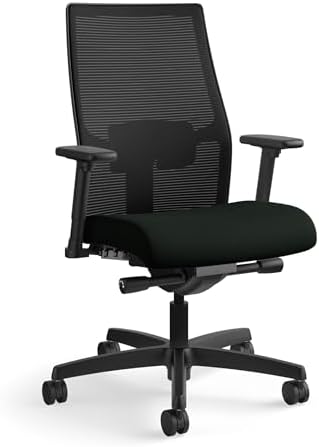
An overview. HON, an office furniture company, makes the Ignition 2.0, a mesh task chair. In the listings, it says that the back is stretchy and can be adjusted in four ways. The lumbar support is also adjustable, and the arms can be changed in height and width. It can hold up to 300 pounds.
Why it stands out. The Staples ad we found mentions a lifetime warranty. The mesh and seating controls are covered for 12 years. The seat is between 17” and 21” high. The seat is 19” to 20” wide and 16” to 19.5” deep, depending on how it is set up.
Pros:
- The seat glides, and the lumbar is adjustable.
- Can hold 300 pounds
- Limited warranty for life
Cons:
- Prices aren’t always the same. Fabric/mesh combos at Staples cost about $570 to $610, but some roundups say they cost $400 to $450. Check the total and configuration.
- For tall people, the seat depth is on the shallow side.
- Specs depend on the type of seat (low back, mid-back, mesh seat, fabric seat)
Who should think about it? People in the middle price range who want a mesh chair with a seat slider and a lifetime warranty.
Price and buying advice. List of Staples. We couldn’t find HON’s product page, so visit HON’s website for the most up-to-date configurator and warranty details.
The final word. If you’re willing to pay about average for a lifetime warranty and seat glide, this is a good choice. But make sure you check the price and configuration first.
A Note on Refurbished Chairs
You can buy used Steelcase and Herman Miller chairs for much less than new ones. Some refurbished sellers were left out because we couldn’t independently check their names, grading standards, or return policies. If you buy something used, make sure you write it down:
- Who fixed it up, and what does “Grade A/B” mean to them
- The service warranty from the seller and any maker warranties that are still valid
- When can I return the chairs, and who pays for shipping (chairs are heavy)?
If the exact model or version is shown, like Leap V2 with the lumbar option There is a “Refurbished” section in Herman Miller’s store that is the best place to start for that brand.
Best Office Chair for Back Pain by Budget
You can get better materials, more adjustments, or a longer warranty if you pay more. It doesn’t promise that the pain will go away. Here’s what you should put first at every level.
| Budget | What we found | What to prioritize |
| Under $300 | No chair we could verify as having adjustable lumbar (see note below) | Seat-height range that fits your desk, a firm and supportive back, and a return policy you can afford to use |
| $300–$600 | Branch Ergonomic Chair ($500), Branch Ergonomic Chair Pro ($499); HON Ignition 2.0 sits near the top of this band in the listings we found | Adjustable lumbar, seat depth, and a 30-day trial |
| $600–$1,000 | Steelcase Series 2 (~$770–$800) | A confirmed adjustable-lumbar configuration and a 10+ year warranty |
| $1,000+ | Steelcase Leap, Herman Miller Aeron | The exact back-support option, size (Aeron), and the return window |
Why no pick under $300? Branch lists its Daily Chair at $259 (225 lb capacity, described as “balanced” support) and its Multitask Chair at $279 (“essential” support). The Branch pages we reviewed didn’t list an adjustable lumbar on either chair, so we didn’t recommend them for back-support needs.
Chairs under $300 from other brands exist, but we couldn’t verify their specs or return terms from a manufacturer page. If you must stay under $300, use the fit test below, buy from a seller with free or low-cost returns, and add a separate lumbar cushion if the backrest is flat. OSHA suggests a rolled towel or removable support cushion as a stopgap for chairs without lumbar support.
For the bigger-picture budget math (chair vs. desk vs. monitor), see our guide to planning your home office budget.
What Makes an Office Chair Suitable for Back Support?
We keep this section specific to back support. For the full feature walkthrough (casters, headrests, bases), see our complete office chair buying guide.
Lumbar support: fixed vs. adjustable
The lumbar support fits the inward curve of your lower back. NIOSH says the goal is to support the lordosis, the spine’s natural inward curve. OSHA says a backrest should have adjustable lumbar support so the outward curve fits the small of your back.
- If the curve hits you at the waist, a fixed lumbar can help. If it doesn’t, it’s either not pushing at all or in the wrong place.
- The height-adjustable lumbar lets you put the support where it feels best for your lower back.
- Leap and Branch Pro lumbars let you change both the height and the depth (or firmness). You can also change how hard it pulls.
- A flexing back, like Steelcase’s LiveBack, is made to move with you instead of staying in one shape.
Not one of these is perfect for everyone. “It’s not always better to have more lumbar.” Too much can feel like someone is punching you in the back.
Seat depth
OSHA says the seat should support most of your thigh and not hit the back of your knee. A seat that’s too deep pushes shorter people forward and away from the backrest. This stops the lumbar support from working. You can adjust the seat depth, or choose different sizes, like with the Aeron. This lets you sit back in the chair.
How high is the seat?
According to OSHA, the right height is when your back knee is just above the seat, and the sole of your foot rests on the floor. If your desk is too high, don’t perch with your feet hanging off. Instead, use a stable footrest.
Backrest and lean back
OSHA guidelines emphasize maintaining proper posture while working. This includes ensuring a chair’s backrest is reclined at least 15 degrees from upright, with the option to lock it in place or adjust its resistance as needed. Additionally, OSHA considers various positions—such as sitting upright, squatting, leaning, and reclining (with a torso-to-thigh angle of 105 to 120 degrees)—to be acceptable “neutral” postures; however, no single “correct” posture has been defined for standing.
Armrests
When you use armrests, you should be able to relax your shoulders and keep your elbows close to your body. OSHA says to set them so they touch only your lower arms when your arms are at your sides. When armrests are too high or too wide, they can pull your shoulders and back into bad positions. OSHA also says people don’t have to use armrests; if they can’t be changed, they can be removed.
The material and the padding
Mesh lets air flow through and doesn’t trap heat. The foam and fabric feel softer. You can clean leather and vinyl with a damp cloth. A firm or soft seat isn’t better for everyone, and no one seat has been shown to help with back pain. Pick the one you can sit on for hours.
Size and fit of the body
Compare the seat’s width, depth, height range, and weight limit to your body. Capacity on our short list ranges from 275 lb for the Branch to 400 lb for the Leap, Series 2, and Aeron size C. Don’t rely on the word “adjustable”; short and tall users should check the minimum and maximum seat heights.
Back-up and warranty
Find out the trial period length, who pays for return shipping, whether there are any refund fees, which parts are covered, and whether one-shift or multi-shift use is covered. Branch and Herman Miller both have 30-day return policies that include shipping costs being refunded. Check with the seller to make sure they match your needs.
How to Adjust Your Office Chair for Better Sitting Comfort
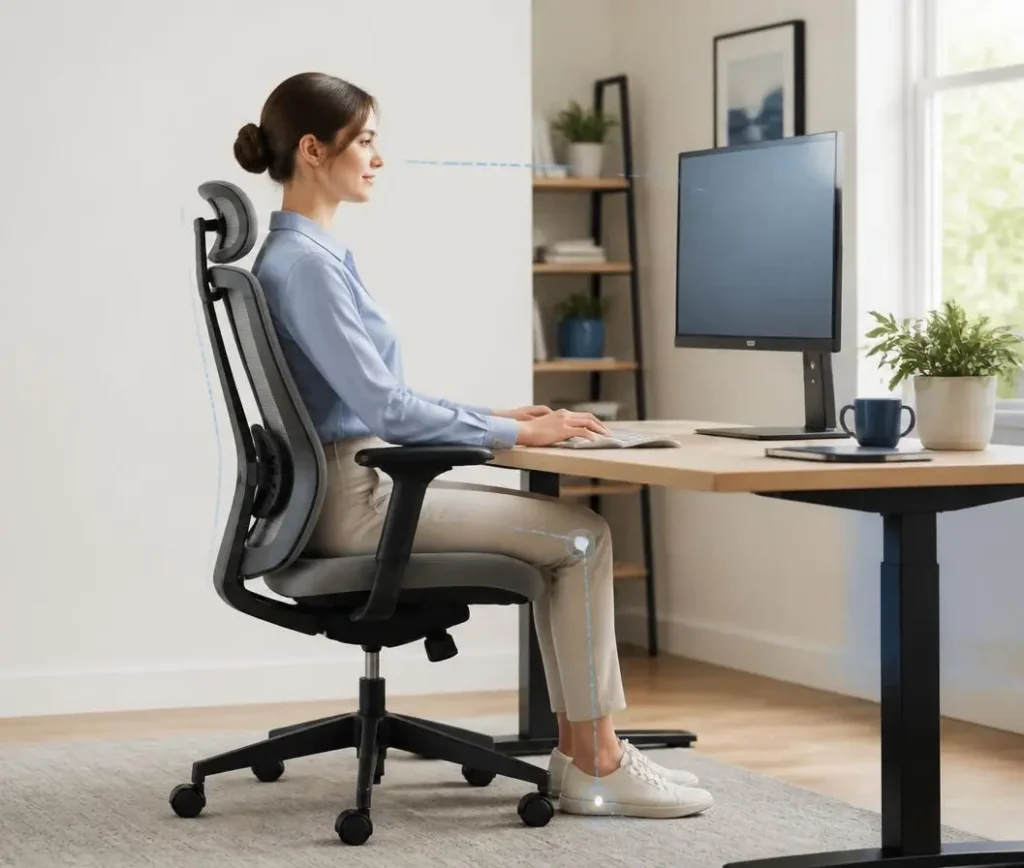
These are just starting points; they’re not rules that everyone has to follow. They do what OSHA and NIOSH tell them to do.
1. Set the height of the seat. Back up all the way. Your foot should be on the floor, or a stable footrest, and the back of your knee should be just above the seat.
2. Choose how deep the seat is. You can move the seat around so that it supports most of your thigh but doesn’t touch the back of your knee. Size does matter for chairs without a slider.
3. Put the lower back in place. Adjust the height until the outward curve fits around the small of your back. Instead of adding more pressure all at once, do it over days or hours.
4. Put the backrest in place and lean back. Make the tension just right so you can lean back without feeling thrown back, and when you need a break, let go and relax. At least 15° of relaxation is recommended by OSHA.
Set the seats in place. Keep your lower arms straight, your shoulders loose, and your elbows close to your sides. If the armrests raise your shoulders, lower them or remove them.
6. Put the chair in the right place next to the desk and keyboard. Keep your elbows bent 90 to 120 degrees and your wrists straight. If you have to lean forward to type, your back doesn’t get enough support.
7. Put the monitor in place. NIOSH recommends an external monitor about an arm’s length away, with the screen’s top at or below eye level. Your back will often twitch if you crane your neck.
8. Check in and get up. OSHA says that even with good posture, staying still for long periods is bad for you. They recommend making small changes: stretch, stand up, and walk around. NIOSH says adding five-minute breaks every hour to the two daily rest breaks greatly reduces muscle and eye pain.
If your desk is adjustable, you can switch between sitting and standing while working. Check out our guide to picking the right standing desk and our list of the best standing desks. The desk, monitor, and lighting complete the workstation. Our complete home office setup checklist goes over these items.
Can an Office Chair Help With Back Pain?
Making sure your chair fits and is set up correctly can help you sit more comfortably and keep a good posture. It can’t promise pain relief, and there’s limited research on chairs and back pain.
What the proof says:
- A 2012 review of five studies showed that chair interventions instantly reduced pain in the musculoskeletal system. However, the authors said there was only moderate evidence and a lack of information on long-term effects and recurrence.
- An in-depth study published in 2022 in the International Journal of Occupational Safety and Ergonomics looked at chair interventions and low back pain in office workers. It reported that data quality was very low to low and that opinions differed. Based on this, it said chair interventions were not recommended to reduce low back pain or discomfort.
- A Cochrane evaluation found that workplace initiatives that encouraged standing or walking did not lessen musculoskeletal discomfort. Sit-stand workstations may benefit workers with low back pain, but another meta-analysis found insufficient research on back pain patients.
In short, a decent chair should make you sit more comfortably, but avoid chairs that claim to cure. OSHA and NIOSH scrutinize chair routines like adjusting, changing postures, and taking breaks.
Your chair is only one part of your workstation and health, and it may contribute to back pain. We cannot diagnose or treat. This includes bulging disks. No chair we looked at helped with any spine disease, so ask your doctor for seating advice.
When to Get Medical Advice
The Mayo Clinic says most back pain goes away on its own within a few weeks, and you should see a doctor if certain symptoms appear. To sum up:
- If back pain makes it hard to control your bowels or bladder, call 911 or go to the emergency room right away.
- See a doctor if your back pain doesn’t get better after a week of home treatment, if it makes one or both legs weak, numb, or tingly, if it makes you lose weight without meaning to, or if it causes your back to swell or change color.
- According to Mayo’s general advice on back pain, you should see a doctor right away if you have pain after a fall or injury or if you have a fever.
In any of these situations, getting a new chair is not the next step. Instead, you should talk to a clinician.
Common Mistakes When Buying an Office Chair for Back Pain
You can only use this list to choose a chair. For more general setup mistakes, check out our guide on how to set up your home office wrong.
- Buying based on looks. You can’t sit in a chair that looks good in pictures but doesn’t fit your body or leg length.
- Thinking that more lumbar support is better. Lumbar pain can be severe. Choose a chair with removable lumbar support, like the Branch chairs.
- Putting aside seat depth. If the seat is too deep, you’ll slide forward, and your lower back won’t touch the ground.
- Not paying attention to width and weight limit. The Branch chairs can hold up to 275 pounds, the HON chairs up to 300 pounds, and the Leap, Series 2, and Aeron C chairs up to 400 pounds.
- Thinking that a high price means comfort. Prices get you materials, adjustability, and a warranty, but not a custom fit.
- Not following the return policy. A back support’s fit can take days to figure out. Pick a seller with a real trial period, and always check who pays to ship the item back.
- Making the wrong choice when buying. You can change the Aeron’s back support, but you can’t change the Series 2 Air Back’s lumbar support. Check out the builder before you pay.
- Thinking that a chair will fix all of their back pain problems. Look at the proof.
- Not moving at all during the day. OSHA says it’s not healthy to hold good posture for long.
Final Verdict: Which Office Chair Should You Choose?
Use these questions to cut it down to two or three:
- Do you have more than $1,300 and want the most adjustable back support? Choose the Steelcase Leap. If you get hot or sit at the edge of the height range, add the Herman Miller Aeron (pick your size and decide whether you want adjustable back support).
- Want an adjustable bed that’s strong for less than $500? Pick the Branch Ergonomic Chair Pro ($499) from the list. If $499 is too much, the Branch Ergonomic Chair ($369) still lets you adjust the cushioning and seat depth.
- Do you like Steelcase but not the prices at Leap? Check out the Series 2 for about $770 to $800, but only in a model with an adjustable lumbar.
- Want a mesh chair with a lifetime guarantee and a seat that can be moved? Check out the HON Ignition 2.0 once you know the exact price and features.
Before you buy, make sure you know the latest specs, the exact setup, the return policy, and the warranty. Then move around a lot for a week or two to get used to it.
Read on for more on setting up a full remote work setup, being more productive while working from home, and the tools you need for remote work.
Sources
- OSHA, Computer Workstations eTool: Chairs https://www.osha.gov/etools/computer-workstations/components/chairs
- OSHA, Good Working Positions https://www.osha.gov/etools/computer-workstations/positions/
- NIOSH/CDC, Working from Home https://www.cdc.gov/niosh/bulletin/2020/working-from-home.html
- Mayo Clinic, Back pain: when to see a doctor https://www.mayoclinic.org/symptoms/back-pain/basics/when-to-see-doctor/sym-20050878
- Systematic review: chair intervention and musculoskeletal symptoms (2012) https://pmc.ncbi.nlm.nih.gov/articles/PMC3552974
- Systematic review: chair intervention and low back pain in office workers (2022) https://www.epistemonikos.org/en/documents/5647df9502780ce94c496b5a1619f609a5d13a21
- Sit-stand workstations and low back discomfort meta-analysis (CDC Stacks) https://stacks.cdc.gov/view/cdc/212249
FAQs
Why is lumbar support important in an office chair?
According to government ergonomics guidelines, a chair should support the natural curve of the lower back. That curve is called lordosis by NIOSH. Different people need different amounts of help in different places.
Should you get a hard or soft office chair if you have back pain?
We couldn’t find any solid proof that one is better than the other. Fit and comfort are more important. Pick something that you can sit in for hours without getting sore.
Is a cloth chair good for people who have back pain?
Mesh lets air flow through, and chairs like the Aeron and HON Ignition 2.0 have lumbar support that can be adjusted. Whether mesh feels supportive to you is up to you. If you have a return window, give it a try.
Can an office chair make back pain worse?
If your chair doesn’t fit right—the seat is too deep, the back is too weak, or the armrests raise your shoulders—sitting can hurt. OSHA says a poor chair fit can push people into bad positions, which can make them tired and cause pain. If it makes things worse, stop using the new chair and talk to a professional.
How do I set up my chair to support my back?
Set the seat height so your feet are flat on the ground, and adjust the depth so it supports your thighs without touching your knees. Then place the lumbar support at the small of your back and set the recline tension. Finally, line up the armrests, computer, and monitor. The guide for making changes has full steps.
Is adjusting the seat depth important?
Yes, to help with your back. For taller people to get thigh support, OSHA suggests a seat pan that can be adjusted in depth. This way, shorter people can lean back against the backrest. Instead, the Aeron’s three sizes address this.
When should I see a doctor for back pain?
See a doctor if the pain doesn’t go away after a week of home care, if it moves down a leg, or if it comes with tingling, numbness, or weakness in the leg, or if you lose weight without meaning to. Seek emergency care if you can’t control your bowels or bladder anymore. Read the Mayo Clinic’s advice.

Hi, I am Jiyauddin. Freelance veteran with 20+ years of experience across computer operations, graphic design, and digital marketing. At GearForRemote.com, I share actionable guides, tech reviews, and proven workflows to help remote workers elevate their digital productivity.