
Disclaimer: This post contains affiliate links. This means we may earn a commission should you choose to sign up for a program or make a purchase using these links. There is no added cost to you, but your purchase through these links helps support our content. Check out our disclaimer and disclosure page for more details.
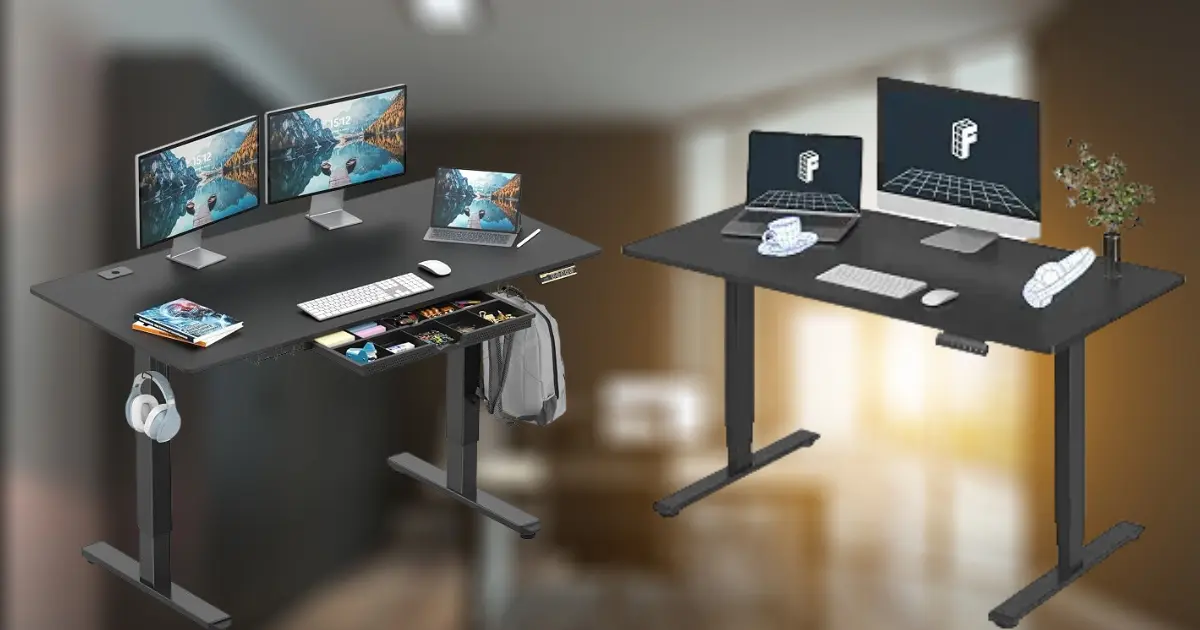
You don’t need a four-figure budget to fix the “my back hurts by 2 p.m.” problem. A few years ago, sub-$300 standing desks were mostly a gamble: wobbly legs, motors that died in year one, desktops that flexed if you leaned on them. That’s changed. The budget tier has genuinely matured, and several electric desks under $300 now hold up to a real workday.
That said, $300 is still a compromise. You’re not getting the triple-motor stability of an Uplift V2 or the 15-year warranty of a premium frame. What you are getting, if you pick carefully, is a motorized desk that raises and lowers smoothly, supports a normal desktop setup, and won’t feel like a liability during a video call.
This guide walks through six standing desks that consistently show up as strong options for US buyers shopping Best Standing Desk Under $300 on Amazon. We reviewed manufacturer specs, verified details against current Amazon listings, and pulled in independent reviewer and customer feedback to separate genuinely solid picks from the ones that just look good in a five-star-heavy listing photo.
A quick note before you dive in: Amazon prices fluctuate often, sometimes by $50 or more depending on lightning deals and color/size variants. Treat every price below as a snapshot, not a guarantee, and check the current Amazon listing before you buy.
The 6 Best Standing Desks Under $300
1. FlexiSpot EN1 — Best Overall
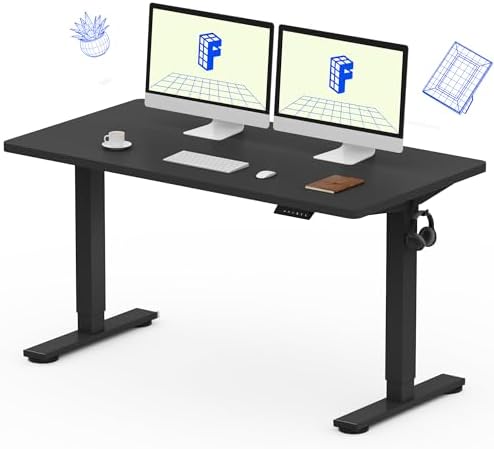
- ONE-PIECE. NO SEAMS: A seamless desktop creates a smooth, uninterrupted workspace with no split lines to distract, makin…
- THE POWER OF 1-INCH: Dense, durable, and sag-resistant, perfect for professionals using drawing tablets, dual screens, o…
- DEEPER. WIDER. BETTER. – A 28″ deep desktop giving coders, creators, and multitaskers the extra space typical 24″ desks …
Best for: Most home office setups Approx. price: $150–$280 (varies by color and promotions; check Amazon for the current price) Desktop size: 48″ x 24″ (also available in 48″x30″ and 55″x28″) Height range: 28.9″–46.5″ Weight capacity: 176 lbs Motor: Single motor, two-stage legs Memory presets: 4
Why We Like It
FlexiSpot has been building standing desks longer than most of its budget competitors, and the EN1 shows it. The defining feature is the one-piece, seamless desktop, most desks in this price range use a “splice board” top made of two panels joined at a seam, which can flex or gap over time. FlexiSpot’s single slab of engineered wood is more rigid from day one and tends to stay that way.
The steel frame is rated for 176 lbs, which is plenty of headroom for a laptop, a couple of monitors, a mechanical keyboard, and the usual desk clutter, as long as you’re not stacking a full multi-monitor arm setup plus a PC tower on top.
What Could Be Better
It’s a single-motor desk, so it lifts a touch slower and can feel marginally less planted at full height than a dual-motor competitor; most reviewers describe this as a minor wobble when typing firmly at max height, not a structural problem. Assembly takes a real hour with two people, not the “15 minutes” some listings imply.
Who It’s Best For
Anyone who wants a no-drama, dependable desk and values desktop rigidity over extra features like drawers or LED panels. It’s also a solid pick if you’ve been burned by a splice-board desk before.
Who Should Skip It
If you’re working with a heavy dual-monitor arm setup and want maximum stability at full standing height, the dual-motor FEZIBO below is the safer bet.
Real-World Take
Based on current specifications and widely reported independent testing, the EN1’s motor runs quietly (FlexiSpot lists it under 50 dB) and the desk transitions between memory presets smoothly. Customer feedback commonly notes that the one-piece top genuinely does feel sturdier under a keyboard and mouse than cheaper spliced alternatives, which matters most if you type aggressively or share the desk with a standing balance board. For an 8-hour workday, most reviewers describe it as comfortable and low-maintenance, the kind of desk you set up once and stop thinking about.
2. Claiks Electric Standing Desk — Best Budget Pick
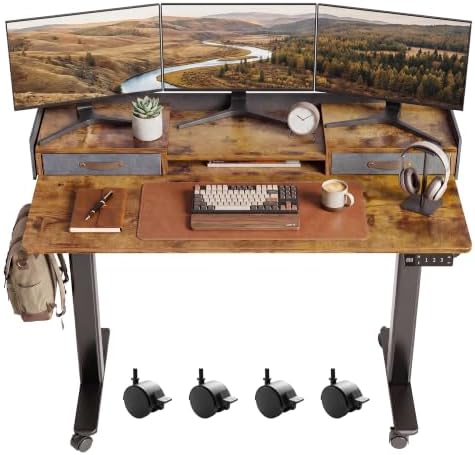
- 2-Tier Shelf Stand – Claiks standing desk with storage and unique felt fence design. The mid desk top with 2 adjustable …
- 2-Drawers for Storage – Adjustable stand desk with drawers. 2 tabletop drawers provide more storage & organize space for…
- Excellent Stability – This stand up desk is made of a sturdy metal steel frame, which provides strong support up to 176L…
Best for: Buyers who want electric height adjustment for as little as possible Approx. price: $100–$170 (Prices can change frequently; check Amazon for the current price.) Desktop size: 48″ x 24″ (also sold in 40″, 55″, and 63″ widths) Height range: 28.3″–46.5″ Weight capacity: 156–176 lbs (varies by size/listing) Motor: Single motor Memory presets: 3
Why We Like It
Claiks consistently undercuts the bigger brands on price while still offering real electric height adjustment, memory presets, and anti-collision protection — features that used to be reserved for pricier desks. Amazon deal-tracking history shows this desk regularly dipping well under $150, which puts it at genuine “budget” territory rather than just “cheaper than average.”
What Could Be Better
The desktop is a splice-board (two-piece) construction rather than a one-piece slab, so it’s a step down in rigidity from the FlexiSpot EN1. The weight capacity is also lower than most other picks on this list, so it’s better suited to lighter setups.
Who It’s Best For
First-time standing desk buyers who aren’t sure they’ll like standing while working and don’t want to spend $250+ to find out. It’s also a reasonable pick for a secondary desk — a kid’s study space, a guest room office, or a light-use laptop station.
Who Should Skip It
If your desk needs to carry a heavy monitor arm, a dock, and multiple accessories, size up in weight capacity elsewhere on this list.
Real-World Take
Reviewers commonly note that the Claiks desk is straightforward to assemble and that the motor, while not silent, isn’t distracting during calls. Because it’s a lighter-duty frame, expect a bit more flex at full height than the heavier-capacity picks below — fine for a laptop and single monitor, less ideal if you’re trying to build a dual-monitor command center.
3. VIVO Black 42 in Standing Desk Converter – Best for Dual Monitors

- Create Instant Active Standing: VIVO’s desk riser provides on-demand standing throughout the day for the freedom to get …
- Space Efficient 42″ Surface: The top surface measures 42” x 15.7”, which provides plenty of room for dual monitors. The …
- Strong Steel Frame: Durable steel frame resists scratches and provides sturdy support for your devices. The desktop hold…
Best for: Multi-monitor and multi-device setups Approx. price: ~$170–$220 direct from VIVO, similar range on Amazon (check current listing, this is one of VIVO’s Amazon Best Sellers) Desktop size: 42″ x 15.7″ (also available in 60″x30″) Height range: Approximately 28.7″–48.6″, varying slightly by color/mouse-pad variant Weight capacity: 220 lbs Motor: Single motor Memory presets: 4
Why We Like It
At 60 inches wide, this is the largest desktop on our list by a meaningful margin, and the extra real estate is exactly what a two-monitor-plus-laptop setup needs. The 220-lb weight capacity is also the highest here, giving you real headroom for a monitor arm, a small PC tower, or a full collection of desk accessories. VIVO backs the desk with a 3-year warranty, and it’s listed as a Best Seller in VIVO’s own standing desk lineup with a solid volume of customer reviews.
What Could Be Better
A bigger desktop means a bigger footprint, this isn’t the desk for a small apartment corner. It’s also single-motor, so expect slightly more give at full height than a dual-motor frame carrying the same load, especially toward the far ends of that 60-inch top.
Who It’s Best For
Remote workers running two monitors, a laptop dock, and speakers who’ve outgrown a 48-inch desktop. It’s also a good fit if you want one desk to double as a light workbench or hobby table.
Who Should Skip It
If your home office is a small bedroom corner or you only need room for a laptop, the extra width is wasted space you’ll have to work around.
Real-World Take
Customer feedback suggests the VIVO 1B series holds its shape well under a loaded dual-monitor setup, and the particle-board desktop, while not as premium as a solid-wood top, resists scratching reasonably well for daily use. Assembly ships in two boxes (frame and desktop separately), so budget extra time and don’t be alarmed if they arrive on different days.
4. FEZIBO Dual Motor Standing Desk with Keyboard Tray — Best Feature-Rich Option

- 【Extra-Large Desktop Workspace】The 71″ x 37″ computer desk offers well-organized zones for monitors, PC towers, printers…
- 【Rock-Solid Stability】Built with integrated dual crossbeam and thickened & extended alloy steel frame, this adjustable d…
- 【Powerful Motor & Smart Controller】Equipped with a high-performance motor, this stand up desk adjusts smoothly from 28.3…
Best for: Buyers who want the most features for the money Approx. price: ~$190–$300 (frequently discounted on Amazon; check current price) Desktop size: 48″ x 24″ Height range: 71.0″x 37.0″ Weight capacity: 176 lbs Motor: Dual motor Memory presets: 3
Why We Like It
This is the only dual-motor desk on our list, which matters more than it sounds — dual motors (one per leg) generally lift more evenly and resist side-to-side rocking better than a single motor pulling both legs through a crossbar. FEZIBO pairs that with a pull-out keyboard tray, two cable-management hooks, a cable tray, and lockable swivel casters, so it functions almost like a mini mobile workstation rather than a fixed desk.
What Could Be Better
The desktop is a two-piece splice board, and several buyers have noted that the keyboard tray, while genuinely useful, isn’t as sturdy as the main desktop — it’s fine for a keyboard and mouse, but don’t lean on it. Some listings also show inconsistent height-range numbers between color variants, so double-check the specific listing you’re buying.
Who It’s Best For
Anyone who wants an under-desk keyboard tray for ergonomic reasons (lower typing position, more monitor-to-eye distance) without paying extra for it as an add-on, and anyone who values the extra stability of dual motors.
Who Should Skip It
If you’d rather have one bigger desktop instead of a smaller desktop plus a keyboard tray, or if you want the top to be one seamless piece, the FlexiSpot EN1 is the cleaner choice.
Real-World Take
Reviewers who use this desk for full 8-hour workdays generally report that it feels sturdy — several specifically mention that it doesn’t wobble even when a pet jumps up or they lean on the edge. The tray’s adjustable height is popular among people trying to fix wrist position. The main recurring complaint in customer feedback is that the keyboard tray doesn’t leave much room for a mouse alongside a full-size keyboard, so some buyers add a small clip-on mouse platform.
5. SHW Electric Standing Desk with Drawer — Best with Storage

- Built-in Convenience Features: Includes integrated hooks for headphones or bags, a cable management tray, and desktop gr…
- Enhanced Stability and Comfort: Equipped with adjustable floor levellers for a stable setup on uneven surfaces and a cur…
- Quiet & Reliable Performance: Powered by a quiet, smooth motorized lift system that ensures seamless transitions between…
Best for: Buyers who want built-in storage without adding furniture Approx. price: ~$180–$250 (Prices can change frequently; check Amazon for the current price.) Desktop size: 55″ x 28″ Height range: 28″–45″ Weight capacity: 150 lbs (per manufacturer caution, don’t exceed this) Motor: Single motor Memory presets: 3, via LED display
Why We Like It
SHW builds the drawer directly into the desk rather than making you buy an add-on organizer, and the compartments inside are actually usable for pens, cables, and small accessories rather than being a token gesture. The large LED display makes it easy to see your exact height at a glance, which is a small but genuinely convenient touch compared to unlabeled button controllers.
What Could Be Better
150 lbs is the lowest weight capacity on this list, and SHW is explicit about not exceeding it, worth factoring in if you run a heavier monitor arm or multiple displays. The maximum height of 45″ is also the shortest range here, which matters if you’re on the taller end of average.
Who It’s Best For
Buyers who want a tidy desk setup with somewhere to actually put things, and who have a light-to-moderate desktop load (laptop, single monitor, basic accessories).
Who Should Skip It
Taller users, or anyone planning to mount a heavy monitor arm and multiple screens, should look at the VIVO or ErGear instead.
Real-World Take
Customer feedback suggests the desk is straightforward to assemble and that the drawer slides smoothly without sagging under normal use. Reviewers commonly mention that the desktop surface is scratch-resistant and easy to wipe down. Because of the lower weight ceiling and shorter max height, this is more of a “comfortable daily-use desk” than a “maximum capacity” pick, which is fine, as long as your setup matches.
6. ErGear Electric Standing Desk — Best for Tall Users

- Electric Height Adjustable Standing Desk for Comfortable Work – Switch effortlessly between sitting and standing with th…
- Powerful Motor with Memory Presets – Equipped with a quiet, powerful lift motor, this sit stand desk allows seamless adj…
- Exceptional Stability Steel Frame – Built with a heavy-duty alloy steel frame and aerospace-grade lifting columns, this …
Best for: Taller users who need more headroom at standing height Approx. price: ~$190–$260 (Prices can change frequently; check Amazon for the current price.) Desktop size: 55″ x 28″ Height range: 27.9″–46.8″ Weight capacity: 176 lbs Motor: Single motor Memory presets: 4
Why We Like It
ErGear’s 55×28 desk pairs one of the higher max-height numbers on this list (46.8″) with an unusually deep 28-inch desktop, which gives taller users both the vertical reach and the extra desk depth to keep a monitor at a comfortable viewing distance. The manufacturer rates the motor for 50,000 lift cycles, and the frame uses automotive-grade cold-rolled steel rather than the thinner-gauge steel found on some budget competitors.
What Could Be Better
Like several desks in this range, the desktop is a two-piece splice board rather than a single slab, so expect a visible (if minor) seam. It’s also worth noting the max height, while solid for this price tier, still tops out shorter than premium three-stage frames, very tall users (6’4″+) should still measure carefully before buying any desk in this price range.
Who It’s Best For
Taller remote workers who’ve found 46-inch max heights on other budget desks to be a stretch, and anyone who wants a deep desktop for a monitor-plus-notebook layout.
Who Should Skip It
Shorter users don’t need the extra height range and might prefer the more compact FlexiSpot EN1 or Claiks options.
Real-World Take
Reviewers generally describe the motor as quiet and the lift as smooth across the full height range. Because the desktop is deep (28 inches) as well as wide, some buyers in smaller rooms have noted it takes up more floor space than they expected; measure your space before ordering, not just the desk width.
Comparison Table
| Product | Price | Desktop Size | Height Range | Weight Capacity | Motor | Presets | Best Use | Main Drawback |
| FlexiSpot EN1 | ~$150–$280 | 48″x24″ | 28.9″–46.5″ | 176 lbs | Single | 4 | All-around home office | Single motor, no storage |
| Claiks | ~$100–$170 | 48″x24″ | 28.3″–46.5″ | 156–176 lbs | Single | 3 | First standing desk on a budget | Lower weight capacity |
| VIVO 1B Series | ~$170–$220 | 60″x24″ | ~28.7″–48.6″ | 220 lbs | Single | 4 | Dual-monitor setups | Large footprint |
| FEZIBO Dual Motor | ~$190–$260 | 48″x24″ | 71.0″–37.0″ | 176 lbs | Dual | 3 | Ergonomic keyboard positioning | Tray isn’t very sturdy |
| SHW w/ Drawer | ~$180–$250 | 55″x28″ | 28″–45″ | 150 lbs | Single | 3 | Built-in storage | Lowest weight capacity, shortest max height |
| ErGear | ~$190–$260 | 55″x28″ | 27.9″–46.8″ | 176 lbs | Single | 4 | Taller users, deep desktop | Larger footprint, splice-board top |
How We Selected the Best Standing Desks Under $300
We evaluate desks in this category for:
- Price vs features (value)
- Popularity on Amazon and amount of feedback from consumers
- Frame quality and frame material
- Reported stability, particularly at standing height
- Range of height and fit for various user heights
- Weight capacity vs. a standard remote-work setup
- Motor performance (single vs dual, noise, speed of lift)
- Desktop size and material
- Number and usefulness of memory presets
- Cable management features
- Warranty length and brand support
- Overall suitability for 8-hour remote work days
We cross-checked manufacturer specifications against current Amazon listings and layered in independent reviewer and verified-customer feedback to flag real-world strengths and weaknesses. Prices, ratings, and availability change frequently on Amazon — always confirm current details on the listing before buying.
What to Look for in a Standing Desk Under $300
1. Height Range
Your ideal standing height depends on your own height and your elbow position, not a generic number. As a rough guide, most people need a desk that can reach somewhere between 42″ and 48″ to stand comfortably, and around 28″–30″ to sit comfortably. If you’re above about 6’1″, pay close attention to the maximum height listed — some budget desks top out lower than you’d expect once you account for desktop thickness.
2. Stability
Stability matters most at full standing height, where the legs are extended and any flex in the frame or desktop becomes more noticeable. Dual-motor desks (like the FEZIBO on this list) generally handle this better than single-motor desks, but a well-built single-motor frame with a rigid, one-piece desktop — like the FlexiSpot EN1 — can still feel plenty solid for typing and normal desk use.
3. Weight Capacity
To estimate your real load, add up your actual gear: a 27″ monitor is roughly 10–15 lbs, a monitor arm can add another 5–10 lbs of static load plus leverage stress, a laptop and dock run 3–6 lbs, and a mechanical keyboard, speakers, and accessories can easily add another 5–10 lbs combined. A modest single-monitor setup might total 25–35 lbs; a dual-monitor arm setup with a small PC tower can climb past 60–70 lbs. Leave real headroom rather than shopping right up to a desk’s rated maximum.
4. Motor Type
A single motor sits in the crossbar and drives both legs through a shared mechanism — it’s cheaper to build and usually fine for lighter loads. A dual motor puts one motor in each leg, so both sides lift independently and in sync, which generally means better stability under uneven loads (like a monitor arm mounted off-center) and a bit more resistance to side-to-side rocking. Dual motor is not strictly needed on every setup, but is a meaningful upgrade if stability is your top priority.
5. Desktop Size
- 40″ x 24″ — Fits a laptop and single small monitor; best for tight spaces.
- 48″ x 24″ — The most common size in this price range; comfortably fits one monitor plus a laptop, or two smaller monitors close together.
- 55″ x 24″–28″ — Enough room for two full-size monitors or one ultrawide plus a laptop.
- 60″ x 24″–30″ — Best for dual-monitor-plus-laptop setups or anyone who wants generous elbow room.
6. Memory Presets
Two to four presets let you save specific heights (like “sit,” “stand,” and maybe a “perching” height) so you’re not eyeballing the same position every time. This sounds minor until you’re doing it a dozen times a day — consistent presets mean you actually use the sit-stand feature instead of leaving the desk parked in one position out of inertia.
7. Cable Management
At this price, expect basic cable management — a grommet hole, a hook or two, maybe a small tray — rather than a fully enclosed cable channel. It’s enough to keep cords from dangling into the moving legs, which matters more for safety than aesthetics, but don’t expect a magazine-photo cable setup out of the box.
8. Warranty
A motorized desk has more that can go wrong than a static one — the motor, the control board, the height sensors. A 1-year warranty is the bare minimum you should accept; 3-plus years (like VIVO offers) is a meaningfully better sign the manufacturer stands behind the electronics.
9. Assembly
Nearly every desk in this category ships in two or more boxes and requires real assembly — budget 45 minutes to 90 minutes, ideally with a second person for flipping the desktop and aligning the legs. Check whether a video guide is available (most brands now provide one) and read a few assembly-specific reviews before you buy, since that’s often where budget brands cut corners.
What is the Right Height for a Standing Desk?
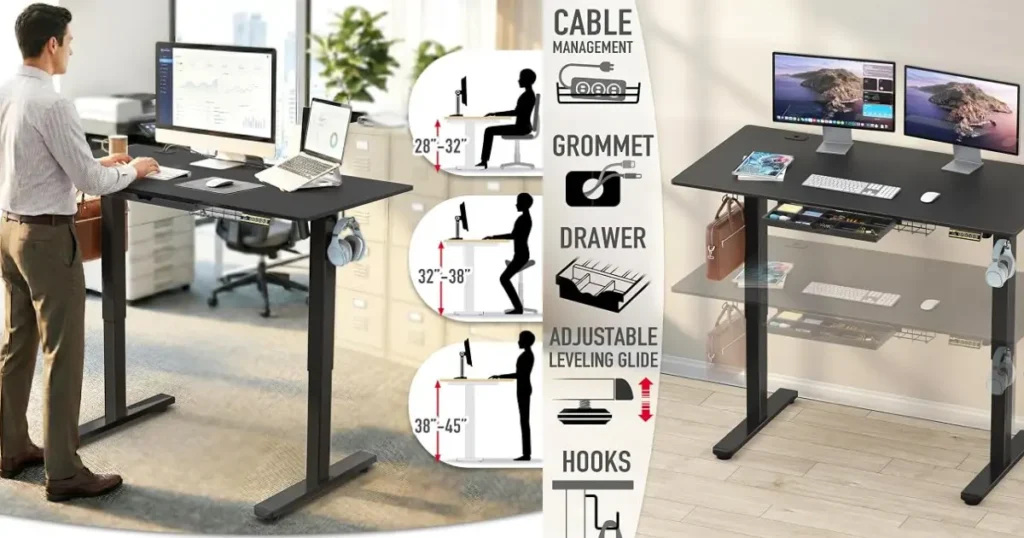
The basic ergonomic setup is the same whether your desk costs $300 or $1,300:
- Elbows bent around 90 degrees when your hands are on the keyboard
- Shoulders relaxed, not hunched up toward your ears
- Monitor top roughly at eye level, about an arm’s length away
- Wrists in a reasonably neutral position, not bent sharply up or down
- Feet flat and comfortably planted, whether sitting or standing
Alternating between sitting and standing throughout the day matters more than standing continuously — most ergonomics guidance suggests standing desks work best as part of a mix, not as an all-day-on-your-feet replacement for sitting. A sit-stand desk may help with posture and can make it easier to build more movement into your day, but it isn’t a cure-all — it won’t replace regular breaks, stretching, or general activity, and standing desks alone don’t guarantee weight loss or eliminate back pain for everyone.
Standing Desk vs. Regular Desk
| Feature | Standing Desk | Traditional Desk |
| Height adjustment | Yes, usually electric or manual | Fixed height only |
| Sitting/standing flexibility | Switch throughout the day | Sitting only |
| Price | Generally higher, even at budget tier | Often cheaper |
| Space | Similar footprint, but needs floor clearance to lower fully | Similar footprint |
| Best for | Remote workers wanting movement variety | Buyers on a tight budget or with no interest in standing |
A standing desk is worth the extra cost if you’re at a desk most of the day and want the option to move, even without full-time standing, having the choice available tends to get used. If you already take frequent breaks away from your desk or are on a tight budget, a solid traditional desk (or a standing desk converter on top of one) is still a reasonable choice.
Related Articles
- Home Office Budget Planning Guide: How Much Should You Spend?
- Complete Home Office Setup Checklist for 2026
- 12 Home Office Setup Mistakes to Avoid (And How to Fix Them)
- Remote Work Essentials for Beginners : Full Guide (2026)
- Best Standing Desks of 2026: 6 Models Worth Your Money
Sources & Research
- Amazon US product listings for FlexiSpot, VIVO, FEZIBO, SHW, ErGear, and Claiks standing desks
- Manufacturer specification pages (FlexiSpot.com, VIVO-us.com, SHWdesks.com, theergear.com)
- Independent standing desk reviews and buying guides
- Verified Amazon customer reviews for real-world assembly, stability, and long-term use feedback
FAQs
What is the best standing desk under $300?
For most home offices, the FlexiSpot EN1 offers the best overall balance of stability, desktop quality, and price. If you need more desktop space for dual monitors, the VIVO 60″x24″ is a stronger fit.
Are standing desks under $300 worth buying?
Yes, for most people — the budget tier has improved significantly, and desks like the ones on this list offer real electric height adjustment, memory presets, and reasonable stability. Just match the weight capacity and desktop size to your actual setup rather than assuming every budget desk performs the same.
What is the best electric standing desk under $300?
All six desks on this list are electric. Among them, the FEZIBO Dual Motor is the strongest pick if dual-motor stability specifically is your priority.
Can a $300 standing desk hold two monitors?
Generally yes, especially the VIVO (220 lbs) or ErGear and SHW (176 lbs and 150 lbs respectively). Just add up the actual weight of your monitors, arm, and accessories before assuming any desk will handle your specific setup.
How stable are cheap standing desks?
It varies by build. Single-motor desks with a one-piece desktop, like the FlexiSpot EN1, tend to feel more stable than splice-board desks at the same price. Dual-motor desks generally offer the best stability at standing height, but a well-built single-motor frame is often stable enough for normal desk work.
What height should my standing desk be?
It depends on your height, but the general target is elbows at roughly 90 degrees with your hands on the keyboard while standing. Check a desk’s maximum height against your own measurements rather than relying on “one size fits most” marketing.
Is a dual-motor standing desk better?
Dual-motor desks are usually more level and resist wobbling, especially with unbalanced loads like an off-center monitor arm. They’re a genuine upgrade, though a well-built single-motor desk can still be plenty stable for typical use.
How much weight can a budget standing desk hold?
It ranges widely in this price tier, from around 150 lbs (SHW) up to 220 lbs (VIVO). Always check the specific listing, since weight capacity can vary even between colors and sizes within the same desk line.
How long should a standing desk last?
With normal daily use, a well-reviewed budget electric desk frame can reasonably be expected to last several years; the motor and control electronics typically show wear first. A longer manufacturer warranty (3+ years) is a reasonable signal of how much a brand stands behind its electronics.

Hi, I am Jiyauddin. Freelance veteran with 20+ years of experience across computer operations, graphic design, and digital marketing. At GearForRemote.com, I share actionable guides, tech reviews, and proven workflows to help remote workers elevate their digital productivity.