
Disclaimer: This post contains affiliate links. This means we may earn a commission should you choose to sign up for a program or make a purchase using these links. There is no added cost to you, but your purchase through these links helps support our content. Check out our disclaimer and disclosure page for more details.
You spent real money on your laptop, your monitor, maybe a standing desk. The chair holding you up for eight hours a day is regularly a hand-me-down or a desire buy. Your chair may feel fine for 20 minutes. The real test is 3 p.m., when your lower back is tired, and your shoulders have crept up toward your ears.
The best ergonomic office chair isn’t necessarily the one from the biggest brand or the most expensive model. It comes down to adjustability, fit, and claims you can actually verify. That’s why we gathered manufacturer details, current US pricing, and independent test results for six chairs across various price points; details are below.
Quick Answer: Best Ergonomic Office Chairs
What is the best ergonomic office chair? Based on manufacturer specifications and independent testing, the Steelcase Leap is the most fully adjustable chair we reviewed, and it topped TechGearLab’s rankings. At roughly $1,350–$1,440 new, it’s a big spend. For most home offices, the Branch Ergonomic Chair Pro (about $499) packs the most adjustments per dollar on paper. The best chair for you still depends on your height, weight, and desk.
Table of Contents
Quick picks by need
- The Steelcase Leap is the best chair for long workdays and lower back support.
- The Herman Miller Aeron is the best high-end mesh chair, and it comes in three sizes.
- The Steelcase Series 2 is the best long-term MID-Priced buy.
- The Branch Ergonomic Chair Pro is the best deal for less than $500.
- FlexiSpot C7 Max is the best WiFi chair for big people on a budget.
- The Sihoo Doro C300 is the best low-cost option, but you should know a few things about it.
| Chair | Best For | Approx. Price | Key Strength | Adjustability | Warranty |
| Steelcase Leap | Long days, back support | ~$1,350–$1,440 | Adjustment range, top independent score | Seat height/depth, lumbar height + depth, 4D arms | 12 years |
| Herman Miller Aeron | Breathability, size options | ~$649–$1,919 | 3 sizes, mesh | Lumbar/sacral, arms, tilt (varies by config) | 3 years |
| Steelcase Series 2 | Mid-price longevity | ~$599–$800 | 400 lb rating, Steelcase warranty | Seat height/depth, lumbar height, 4D arms | 12 years (limited) |
| Branch Ergonomic Chair Pro | Value under $500 | ~$499 | 14 adjustment points | Seat depth, lumbar, 5D arms, forward tilt | |
| FlexiSpot C7 Max | Taller users, headrest | ~$400–$430 | Adjustability per dollar | Seat depth, lumbar, 5D arms, headrest | |
| Sihoo Doro C300 | Tight budgets | ~$280 (sale) | Low price, headrest, mesh | Arms, headrest, backrest height | 3 years |
How We Compared These Chairs
To give you the best advice, we did a lot of study at our desks, looking at official manufacturer specs, verified retailer data, and real-life feedback from respected ergonomic reviewers (who are fully credited below). When technical details were different, we focused on the manufacturer’s specs that had been checked. In rare cases, like with the Sihoo C300, where reports kept being different, we made those differences clear.
Need a step-by-step guide to sizing and ergonomics? Check out our full Buying an Office Chair guide. If you’re ready to look at the best options, here are the adjustable chairs that should be on your short list.
Our Top Picks
Steelcase Leap (V2): Best for Long Workdays and Back Support
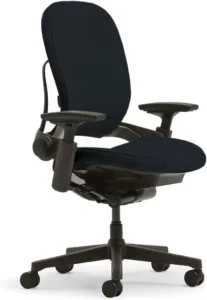
Best for people who work more than eight hours a day, need lower back support, or don’t have a body that fits the “average.” New ones cost about $1,350 to $1,440, depending on design; used ones cost about $470 to $700. 400 pounds of weight (500 pounds for the Leap Plus); 12-year warranty on parts and labor. Key adjustments include seat height and depth, lumbar height and depth, 4D arms, reclining with back lock, tilt tension, and an optional headrest. The seat and back are made of soft, cushioned cloth, not mesh.
Why we recommend it: The Leap gives you separate control for almost every contact point. In TechGearLab’s tests, it scored highest (89/100) and was the only chair they rated for about 10 comfortable hours in their sit test. Steelcase says its LiveBack design lets the backrest flex with your spine. That’s a manufacturer claim, but reviewers did report strong lower-back support. The Tom’s Guide reviewer found more support around the sides of the back than on the Aeron.
What we like
- Seat depth changes by about 3 inches (15.75 to 18.75”), so hip length is not as important.
- Arms can be moved in height (7–11”), width, depth, and pivot
- 400 lb rating and coverage for 12 years
- Five tilt stops let you set the backrest exactly where you want it.
- Comes mostly put together
What could be better? One clear con was the price, which TechGearLab also listed. Tom’s Guide says that the padded fabric doesn’t breathe as well as mesh.
This is who should buy it: People who sit for eight hours or more and want an adjustable chair, or who share a chair with someone of a different size. People who get too hot and want mesh, or who can’t stretch to four figures, should skip it.
Featured for comfort
- Seat height ranges from 15.5 to 20.5” (Steelcase specs from retailers)
- Seat depth can be changed from 15.75” to 18.75”
- Lumbar: height and depth can be changed
- 4D armrests spaced 12.75 to 20” apart
- Tilt and recline: about 96° to 120°, with tension control
- The backrest is 25” high and 18” wide.
- No built-in footrest, so you’ll need to buy one if your feet don’t reach the floor.
Value: A chair with a 12-year warranty costs about $117 a year, or 45 cents per shift, and costs about $1,400. That’s just simple math; it’s not a promise of durability. One way to save money is to buy certified refurbished Leaps with 10–12-year warranties and no damage.
Herman Miller Aeron: Best Premium Mesh Chair, Three Sizes
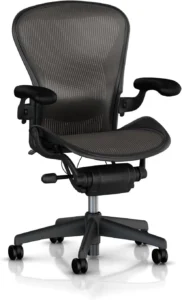
Best for people who get hot at work, need support that lets air flow, and have small or large bodies. Prices range from about $2,215 to $2,650 on Herman Miller’s website (base price: $2,305), though some sellers offer lower prices. Weight capacity: Size A: 300 pounds, B: 350 pounds, and C: 400 pounds. 12-year warranty. Key adjustments include seat height, PostureFit SL back support, arms (fixed, height-adjustable, or fully adjustable), tilt tension, the optional tilt limiter, and forward seat angle. The seat and back are made of 8Z Pellicle elastic mesh.
Why we believe it’s good: Its real edge is its size. Herman Miller sizes A, B, and C are best for people who are 4’10” to 5’4” tall, 5’2” to 6’, and 5’10” to 6’6”. PostureFit SL has two pads, one for the lower back and one to keep the sacrum stable. TechGearLab scored it 73/100 after testing it for 9 hours and said it was one of the nicer mesh-backed chairs they’d seen.
What we like
- It comes in three sizes, so it doesn’t fit everyone.
- Mesh seat and back for airflow (Herman Miller says this, and the material backs this up)
- Arms that can be fully adjusted: 6.8 to 10.8” high, 2.5” depth range, and pivoting
- 12 years of protection and BIFMA Level 3 approval
- You have 30 days to return items to Herman Miller’s own shop.
What could be better? There is no seat depth change (Herman Miller’s page says there isn’t one, and TechGearLab confirms this). Check the options carefully, because cheaper ones may not have adjustable arms and back support. The source says there’s no headrest.
This is who should buy it: People who get too hot and people who are on the small or large side of the size range. People who want a padded seat, need a different seat width, or are price-conscious should skip it.
Featured for comfort
- Size B seats are 16 to 20.5” high.
- Fixed seat depth
- PostureFit SL adjustable for the lower back (optional)
- Armrests can be fully adjusted (optional).
- Recline and tilt: Harmonic 2 tilt; the tilt limiter and seat angle (up to 5° forward) are not standard. Lack of a seat cushion and suspension mesh
- There is no built-in support for your feet.
Value: You’re paying for the size and mesh. The specs say that the Leap has more changes for less money if you don’t need either.
Steelcase Series 2: Best Mid-Priced Long-Term Buy
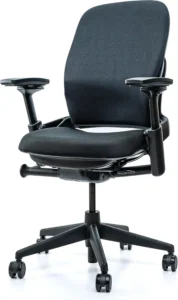
Best for Durability that meets commercial standards without the high cost. Price: around $770 to $800 at Steelcase’s US store. 400 pounds. Parts and labor are covered for 12 years. Key adjustments include seat height, seat depth, height-adjustable lumbar, 4D arms, weight-activated back tension (three settings), and an upright lock. The back can be mesh or knit, and the seat is foam.
Why we believe it’s good: It’s the least expensive way to get four-dimensional arms, seat depth, and Steelcase’s coverage. It can also hold up to 400 pounds. TechGearLab gave it a score of 78/100 after 8 hours of use.
What we like
- A front edge that can bend and a seat depth that can be changed
- 4D arms
- Rated for 400 lbs.
- The tension in your back changes naturally based on your weight
- It’s easy to put together (it took TechGearLab about three minutes).
What could be better? TechGearLab found that it offers greater recline adjustability, even though it has only two tilt-limiter stops and lacks a tension knob. Adjusting the lumbar support while seated can be difficult. The Air Back version’s spine is not adjustable. According to them, the Series 2 lumbar support is height-adjustable only, whereas the Branch lumbar support offers full adjustability.
Who should buy it: People who want a long-lasting Steelcase bench for about half the price of the Leap.
People who shouldn’t buy it: Anyone who wants to fine-tune the recline tension or get the most out of their back support.
Featured for comfort
- Seat height ranges from 16.5” to 21.5”
- The seat depth can be changed
- Most versions of the lumbar can be adjusted for height
- Seat backs: 4D
- Tilt and recline: weight-activated, three options, upright lock
- Doesn’t come with any built-in foot support.
Value: Fair if you plan to use it long-term. It might cost about the same to buy a used Leap, so look around before you buy.
Branch Ergonomic Chair Pro: Best Value Under $500
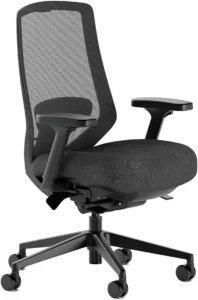
Best for Budget flexibility for a home office. Price: about $499. Weight: about 275 pounds. Warranty: 7 years. Key adjustments include seat height, seat depth, lumbar support, 5D arms, forward seat tilt, tilt tension, and the tall cylinder and headrest (add-ons). Mesh back with a padded seat; vegan leather and leather options; aluminum base.
Reasons we like it: Branch gives 14 reasons for change. TechGearLab found that the standard Branch Ergonomic Chair (not the Pro) works best for most people. They said it was just as comfortable as chairs that cost three to six times as much. A Yahoo Tech review of the Pro said it was easy to adjust and comfortable enough to wear all day.
What we like
- At this price, seat depth, back support, and forward tilt
- A tall cylinder is available for people who are 5’11” or taller.
- Commercial-grade rating from BIFMA
- Warranty for 7 years
- 30 days to return, plus a free ergonomic consultation
What could be better? Reviewers disliked the armrests in both tests. TechGearLab also said it was hard to change the tilt tension and that the standard model seat pan was on the narrow side. It won’t support more than 275 pounds.
People who work from home, weigh less than 275 pounds, and want a fully adjustable chair should buy it. People who are too heavy or need more arm comfort should not buy it.
Featured for comfort
- Height of seat: 17–19.9” (19.3–22.9” with tall cylinder)
- Seat depth: 16.7 to 19.7”
- Lumbar: can be adjusted
- Seat backs: 5D
- Recline and tilt: tilt with tension control and forward tilt of the seat
- Support for your feet: some models come with an optional footrest
Value: This has the most features for the money. You have 30 days to return it and pay for shipping, so measure first.
FlexiSpot C7 Max: Best for Taller Users on a Budget
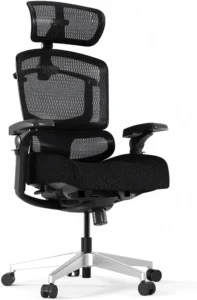
Best for Taller people who want a headrest and lots of adjustment options. Price range: ~$400–$430 directly; third-party sellers charge more (Office Depot lists a footrest version for about $550). 350 pounds for the mesh seat and 300 pounds for the foam seat. Ten-year warranty. Important changes: The chair has a seat depth, 5D arms, a 3D headrest, a lockable recline, and an optional footrest. Foam (with a 0.2-inch layer of latex) or mesh seat; mesh back
Why we believe it’s good: Pro Tool Reviews said it was the most adjustable chair they had ever looked at. The brand also backs it up with a 10-year guarantee.
What we like
- At this price, the headrest, lumbar support, and 5D arms can be adjusted.
- Mesh seat option to let air flow
- A chair is optional
- Lockable recline, between 90° and 128°, according to a store listing
What could be better? On FlexiSpot’s page, the seat height starts at 18.5″, which means that people who are shorter might have their feet hanging off the edge. The original FlexiSpot C7 ad suggests 5’7” to 6’10”.
Who should buy it: Tall people or those who lean back a lot. People who should not buy: Shorter users and people who need a guaranteed return window (not verified).
Featured for comfort
- Seat height ranges from 18.5 to 20.9”
- Seat depth: 15.7 to 17.3”
- Lumbar: flexible and adaptable
- Seat backs: 5D
- Tilt and recline: can be locked
- Foot support: footrest is available
Value: Looks good at about $400 to $430. First, measure the seat height against your legs.
Sihoo Doro C300: Low-Cost Option, With Caveats
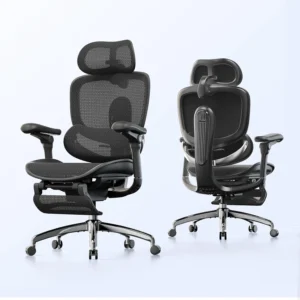
When money is tight and the job is light or part-time, Sihoo’s sale price is about $280, so don’t base your expectations on the “regular” price of $559.99. 300 lb weight limit (Sihoo’s US page says 330 lb, so the listings are wrong). 3 years of warranty. Adjustable 4D arms, headrest, and chair height, plus a weight-sensing recline. Back and seat made of mesh, arms padded with PU
Why we believe it’s good: It costs under $300 and includes a headrest, armrests, and a recline feature. Tom’s Guide said it was easy to use every day.
What we like
- The seat and back are mesh.
- Arms and headrest can be moved.
- Lumbar that adjusts itself
- The lowest price here
What could be better? Tom’s Guide said that the lumbar can’t be adjusted by hand, and the narrow seat pan and low maximum height might not work for taller or bigger people. Sihoo’s regional pages and stores have different specs for things like seat height, seat depth, and capacity.
This is who should buy it: Buyers under $300 who are average-sized and fine with a 3-year warranty. People who should not buy: tall or large buyers, or anyone who needs to support their lower back by hand.
Featured for comfort
- Seat height: different entries (16–19.5” on Amazon)
- Seat depth: different sources disagree on whether it’s fixed or about 17–18”
- Lumbar: changes on its own
- Seat backs: 4D
- Recline and tilt: detects weight
- Foot support: different types of footrests are available
Value: About right at the sale price, not quite right at the “regular” price. Check the specifics of the item you buy.
We were also interested in the HON Ignition 2.0, which costs between $480 and $650, but TechGearLab gave it a lower score (64/100) and pointed out that the back plastic is thin and the seat foam tends to flatten. One of CNN’s top picks was the $400 Steelcase Series 1.
Detailed Comparison Table
| Chair | Price | Seat Height | Seat Depth | Lumbar Support | Armrests | Recline/Tilt | Weight Capacity | Warranty |
| Steelcase Leap | ~$1,350–$1,440 | 15.5–20.5″ | Adjustable, 15.75–18.75″ | Adjustable height + depth | 4D | ~96°–120°, tension, back lock | 400 lb | 12 yrs |
| Herman Miller Aeron | ~$649–$1,919 | Size B: 16–20.5″ | Fixed | Adjustable PostureFit SL (optional) | Fully adjustable (optional) | Harmonic 2; limiter/seat angle optional | 300/350/400 lb | 12 yrs |
| Steelcase Series 2 | ~$599–$800 | 16.5–21.5″ | Adjustable (range not specified) | Height-adjustable (not on Air Back) | 4D | Weight-activated, 3 settings | 400 lb | 12 yrs (limited) |
| Branch Ergonomic Chair Pro | $499 | 17–19.9″ (tall: 19.3–22.9″) | 16.7–19.7″ | Adjustable | 5D | Tension + forward tilt | 275 lb | |
| FlexiSpot C7 Max | ~$400–$430 | 18.5–20.9″ | 15.7–17.3″ | Self-adaptive | 5D | Lockable (~90°–128°) | 300–350 lb | |
| Sihoo Doro C300 | ~$280 | Conflicting | Conflicting | Self-adapting only | 4D | Weight-sensing | 300 lb (330 lb on one page) | 3 yrs |
What Makes an Office Chair Ergonomic?
An ergonomic office chair lets you sit in a neutral, comfortable position all day, and you can adjust it to fit your body and your work. NIOSH and OSHA both stress the need for workstation guidance and a variety of postures. See our Office Chair Buying Guide for a more in-depth look.
How high the seat is. So this is the base. NIOSH says to lie on your back with your feet flat on the floor and your knees and hips at or just above 90°. The OSHA Buying Guide recommends a seat that adjusts between 15 and 22 inches.
How deep the seat is. If the seat is too deep, it will press against your knees. If it’s too shallow, it won’t support your legs. Stahlcase says you should leave 2 to 3 inches of space between the back of your knees and the edge of the seat.
Back support. NIOSH says that when you sit down, your back should be supported in its natural curve toward your thighs. The point is not “more” help. Being able to change the height of your lumbar support is better than having a fixed bump because it fits your curves better.
Armrests that can be moved. OSHA says that armrests should be padded and able to be adjusted in width and height (about 7 to 10.5” above the seat). Your shoulders shouldn’t rise, and your elbows should stay close to your body.
Backrest and slouch. Changes in posture help. OSHA says that while you work, you should keep your torso vertical or within 20–30° of vertical and change your stance often.
Cushion for the seat. Being firm is personal. OSHA recommends a firm, breathable, durable material, along with a rounded “waterfall” front edge.
Able to breathe. Mesh keeps you cooler. Some people feel more supported in padded fabric, like the Leap, but it doesn’t let as much air flow through.
Base and wheels. OSHA recommends a five-legged base. Hard floors and carpet need different casters. Herman Miller makes separate versions for carpet and hard floors. Weight capacity. If you weigh more than 275 pounds, use a chair rated to support that weight. Don’t just look at the “ergonomic” label; also look at the grade.
How to Choose an Ergonomic Office Chair for Your Height and Body Type
Everybody is different, so not every chair will work for everyone. To begin, measure:
- The distance from the floor to the back of the knee compared to the seat height range of the chair
- Seat depth: the difference between the chair’s range and the distance from the bottom to the knees
- Between hip width and seat width
- Elbow height while sitting compared to your desk and the armrest range
- Weight vs. capacity number (leave some room for error). This is the space between your desk and the chair’s width and arm height.
Short people should look for seats with a low minimum height and a short seat width. This is what the Aeron Size A (4’10 “–5’4”) is made for. Watch out for seats that start out high, like the C7 Max’s 18.5” height, and make sure you have a footrest.
Height-wise, most of the chairs here work. Adjust the spine and arms first.
For taller people, look for a tall-cylinder option or a seat range with deeper seats. Branch has a cylinder that is longer, Aeron Size C goes up to 6’6”, and FlexiSpot shows the C7 for 5’7” to 6’10”.
For bigger or heavier users, capacity should come first. The Leap (400 lb; 500 lb Leap Plus), Series 2 (400 lb), and Aeron Size C (400 lb) top this list. The Branch can only hold 275 lb.
Small spaces: Check the width and depth of the whole area. The Leap is 27” wide and 21.75” to 24.75” deep.
Ergonomic Office Chair Budget Guide
How much should I spend on an office chair that is good for my back? For full-time daily use, look for a long warranty and real adjustability (seat depth, lumbar, and adjustable arms). If you need a certain size, mesh, or a 400-pound rating, you will have to pay more. You can see how a chair fits into your whole setup in our Home Office Budget Planning Guide.
For less than $300, you can expect fewer adjustments, shorter warranties (the Sihoo’s is 3 years), and specs that aren’t always the same. Fine for light use if you’re in the middle range. $300 to $600 is the sweet spot. Here you’ll find the Branch Pro ($499), the FlexiSpot C7 Max (~$400–$430), and the ~$400 Steelcase Series 1. These all come with 7–12-year warranties. Series 2 (~$770–$800) and refurbished Leaps (about $470–$750 across the resellers we checked, with 10–12-year warranties and different return windows) cost between $600 and $1,000.
Finally, the New Leap and Aeron cost $1,000 or more. You pay for range, size, and track record. A higher price doesn’t always mean better ergonomics. In its 8-hour sit test, TechGearLab found that the basic Branch Ergonomic Chair did about as well as more expensive chairs.
How to Adjust Your Ergonomic Office Chair
- Set the height of the seat. Hips and knees should be at or just above 90° (NIOSH). Feet should be flat.
- Put your feet in place. Use a chair if you can’t reach the floor.
- Adjust the seat depth. In the Steelcase, set it about 2 to 3 inches behind your knees.
- Set the lumbar. Match the curve in your lower back (OSHA).
- Set the arms up. Keep your elbows close to your body, your wrists up, and your shoulders loose.
- Place the seat and lean back. Keep your torso straight up or within 20 to 30 degrees of straight up (OSHA).
- Put the tilt tension in. You shouldn’t fall back; you should gently lean back.
- Make sure the height of your desk matches. Keep the keyboard and mouse near elbow height. If the desk is too high, you can raise the chair and add a seat.
- Look at your screen. OSHA says that you should keep your head straight and not tilt it.
Moving around can help you feel better. A NIOSH study found that adding 5-minute breaks every hour to regular breaks made people feel better. Change your stance.
In a bigger setup, this is what the chair does. Take a look out our Ultimate Guide to Building a Remote Work Setup and the Full Home Office Setup Checklist.
Common Ergonomic Office Chair Buying Mistakes
- Buying something just because it looks good. Looks don’t tell you anything about how easy it is to change.
- Seat depth changes. Seats that are too long or too short cause the most trouble.
- Not caring about the height range. Stand with your legs up and measure the seat’s lowest and highest points.
- They didn’t check the sizes. Find out how far your desk is from the ground.
- Believing that expensive means cozy. Pay attention to the changes, not the cost.
- Not caring about the weight limit. Make some room.
- Skipping the return and guarantee terms. You are covered for seven to twelve years, and there is a trial period to make sure it fits right.
- Only fixing the lower back. Not for arms, depth, and height.
- Not moving at all. Even the best chair can’t fix bad balance or keep you from taking breaks.
For more on avoidable setup errors, read 12 Home Office Setup Mistakes to Avoid.
Ergonomic Chair vs. Regular Office Chair
| Feature | Ergonomic Office Chair | Basic Office Chair |
| Adjustability | Multiple points (height, depth, arms, lumbar, tilt) | Often height and basic tilt only |
| Lumbar support | Adjustable or contoured | Fixed bump or none |
| Seat depth | Often adjustable | Usually fixed |
| Armrests | Adjustable in several directions | Fixed or limited |
| Recline | Tension and lock options | Basic tilt |
| Long-session suitability | Designed for extended sitting | Better for short sessions |
| Typical price | ~$280–$2,600 | Often under $150 |
“Ergonomic” is a marketing word, not a guarantee of fit. Certifications like BIFMA mostly speak to safety and durability testing, not whether the chair suits your body. Judge it by its adjustments.
Is an Expensive Ergonomic Chair Worth It?
It relies on. Not everyone should buy a chair that costs $1,000 or more. Think about:
- Daily hours: Being able to change times works best for full-time babysitters. Back chairs from Steelcase and Herman Miller come with a 12-year warranty, while Branch’s warranty lasts only 7 years.
- Fit: You can’t buy a chair that doesn’t fit. Over time, a chair that lasts longer can cost less per day.
- You have 30 days to try it out. Both Branch and Herman Miller offer this, and you pay for return shipping.
CNN Underscored tested both chairs and found that the Leap was more comfortable than the Series 1, which costs about $400. However, you may have to pay a lot for those extra comforts. If you can spend that money on a good desk and screen, a $400–$800 chair is a good choice.
Ergonomic Office Chair Buying Checklist
☐ Appropriate range for seat elevation
☐ Suitable seat depth
☐ Lumbar support that can be adjusted
☐ Ergonomic seating pad
☐ Appropriate inclination/angle
☐ Adequate weight limit
☐ Justifiable return/trial policy
☐ Suits your workstation
☐ Conforms to your physique
☐ Aligns with your financial plan
Conclusion
No single ergonomic chair is best for everyone. Consider your body, your budget, your desk, your hours, and how you like to sit. First, measure yourself. Then, choose two or three chairs that can be adjusted to fit your needs. Before you buy, make sure you know the return policy, then spend the first two weeks getting it just right. Even if you haven’t bought all your tools yet, our productivity guide covers the habits that go with good gear.
FAQs
Which office chair is the best for your body?
No one can be a winner. It’s easy to adjust and scores well on its own, but the Steelcase Leap is the better value.
How does a chair make you feel?
This chair adjusts to fit your body and desk by letting you change the seat height and width, the armrests, and the back angle.
Is it worth buying an ergonomic chair?
Most of the time, yes, for full-time desk work. A properly adjusted chair may make you feel more comfortable, but the effects aren’t always the same.
Which office chair is best for working long hours?
In TechGearLab’s tests, the Steelcase Leap scored highest for long hours, at about 10. The Aeron and Series 2 came next, around 9 and 8.
Which change is the most important in chair?
Seat height matters because the other settings depend on having a place to rest your feet.
What height should a desk chair be?
High enough so that your knees and hips are at or just above 90° and your feet are flat. A 15–22” range is what OSHA recommends.
Do you think an office chair should have a headrest?
It’s not required. It’s helpful if you often lie down. The Aeron does not come with a cushion.
Sources & Research
Health and ergonomic guidance
- OSHA, Computer Workstations eTool: Purchasing Guide, Chairs, Evaluation and Additional Information pages (osha.gov/etools/computer-workstations)
- CDC NIOSH Science Blog, “Working from Home: How to Optimize Your Work Environment and Stay Healthy” (https://www.cdc.gov/niosh/bulletin/2020/working-from-home.html)
Manufacturer information
- Steelcase: Leap (steelcase.com/products/office-chairs/leap/), Series 2 (store.steelcase.com/seating/ergonomic-chairs/steelcase-series-2; uk.steelcase.com/products/steelcase-series-2)
- Herman Miller: Aeron (store.hermanmiller.com/office-chairs-aeron/aeron-chair/2195348.html)
- Branch: Ergonomic Chair Pro (branchfurniture.com/products/ergonomic-chair-pro; /ergonomic-chair-pro-sega-edition; /pages/returns)
- FlexiSpot: C7 Max (flexispot.com/flexispot-professional-ergonomic-office-chair-c7m)
- Sihoo: Doro C300 (sihoo.com/products/sihoo-doro-c300-ergonomic-office-chair)
Independent testing and reviews
- TechGearLab, “The Best Office Chairs”
- Tom’s Guide: Steelcase Leap review; Sihoo Doro-C300 review
- Pro Tool Reviews: FlexiSpot C7 Max review
- Yahoo Tech: Branch Ergonomic Chair Pro review
- CNN Underscored: best office chair roundup (2026)
- SeatedLab: Steelcase Series 2 and Branch Pro reviews

Hi, I am Jiyauddin. Freelance veteran with 20+ years of experience across computer operations, graphic design, and digital marketing. At GearForRemote.com, I share actionable guides, tech reviews, and proven workflows to help remote workers elevate their digital productivity.