
Disclaimer: This post contains affiliate links. This means we may earn a commission should you choose to sign up for a program or make a purchase using these links. There is no added cost to you, but your purchase through these links helps support our content. Check out our disclaimer and disclosure page for more details.
A standing desk is easy to buy, until you start comparing them. Every item touts “premium stability” and “whisper-quiet motors,” the height ranges are displayed in microscopic fine print, and the price for what seems like the identical desk can swing $400 depending on the brand on the box.
To cut through the marketing copy, we compare height range, weight capacity, motor setup, desktop size, and warranty terms, plus real assembly experience, across a spread of desks from a $190 budget pick to a $600+ premium frame. That way, you can match a desk to your space, your height, and your setup instead of just picking whatever’s ranked #1 somewhere else.
This article covers six of the best standing desks of 2026: desks for real-world needs, including tight budgets, small apartments, dual-monitor setups, and consumers who want a frame that will truly last more than a decade of daily use. Together, these six picks cover the main use cases we’re comparing here.
| Product | Best for | Price range | Height range | Key feature |
|---|---|---|---|---|
| FlexiSpot E6 | Overall / stability | ~$300–$370 | 22.8″–48.4″ (frame) | Dual motor, 4-leg-adjacent stability at this price |
| SHW Electric Standing Desk | Budget | ~$190–$280 | ~28″–46″ | Built-in drawer, lowest entry price |
| ErGear 48×24 Standing Desk | Small home offices | ~$150–$220 | ~27.9″–46.8″ | Compact footprint, easy assembly |
| Vivo Real (Bamboo) | Customization / eco-conscious | ~$559–$850+ (size-dependent) | 25.5″–50.7″ (extended option) or 30″–49.3″ (standard) | Bamboo top, extensive color/size options |
| Vari Electric Standing Desk | Easy assembly / small spaces | ~$795–$830 (60×30″) | 25″–50.5″ | Near tool-free setup, T-style legs |
| UPLIFT V3 | Premium / tall users | From $599 | 22.6″–48.7″ | 15-year everything-covered warranty, faster motors than prior gen |
FlexiSpot E6 Max: Best Overall Standing Desk
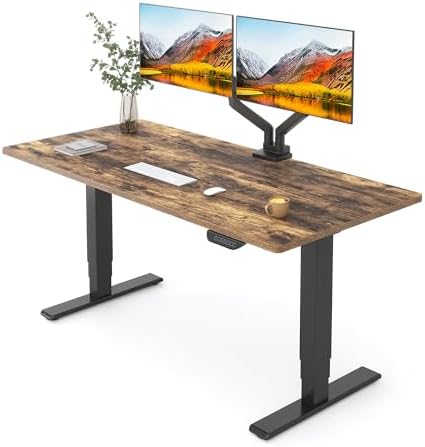
- 【SEAMLESS SOLID SLAB】: Enjoy a seamless and comfortable workspace with our solid slab desktop. Unlike standard standing desks made of multiple pieces,…
- 【3 STAGES LIFT SYSTEM】: Experience versatility with our 3 stages lift system. With a 30% wider range than 2 stages lift systems, our standing desk adj…
- 【QUIET DUAL MOTORS with 80% MORE LOADING CAPACITY】: Experience whisper-quiet adjustments with our dual motors, generating less than 50dB of sound whil…
The FlexiSpot E6 Max is the best choice for workers who need a long-lasting, large standing desk that can handle multiple monitors. It looks great on a desk, adjusts height, and runs smoothly, but it’s best to set it up with two people and a power drill.
Pros
- Wide Height Adjustment Range: The 3-stage lift column can be lowered to 47.5″D x 27.5″W x 23.6″H, making it easy for short people, kids, and tall adults (up to 6’5”) to use.
- High Weight Capacity and Stability: With two motors, it supports more than 330 pounds. When standing, the 3-stage steel frame is less likely to move than standard 2-stage types.
- Lower-cost standing desks often have split or multi-panel surfaces, which leave a seam in the middle. This model, by contrast, has a single 55” x 28” surface.
- Whisper-Quiet Operation: The two motors run quietly at under 50 dB, so adjustments are smooth during work hours.
- Mobility and Extras: It has built-in wire management and anti-collision safety protection, and you can choose to have adjustable caster wheels for easy moving.
- Memory Controls: The smart panel has 4 height settings you can change with one touch.
Cons
- Heavy Unit (Needs Two People to Put Together): The package is heavy because it has a strong steel frame, two motors, and a smooth, single-piece top. Usually, you’ll need two people to put it together safely.
- If you add the optional caster wheels, the minimum height goes up by about 2.5 to 3 inches. This means the lowest setting may be too high for shorter people unless you remove the wheels.
- It’s a larger footprint at 55” x 28”. It offers plenty of workspace, but it can be too big for small areas like bedrooms or nooks.
SHW 55″ Electric Desk: Best Budget (Light Use)

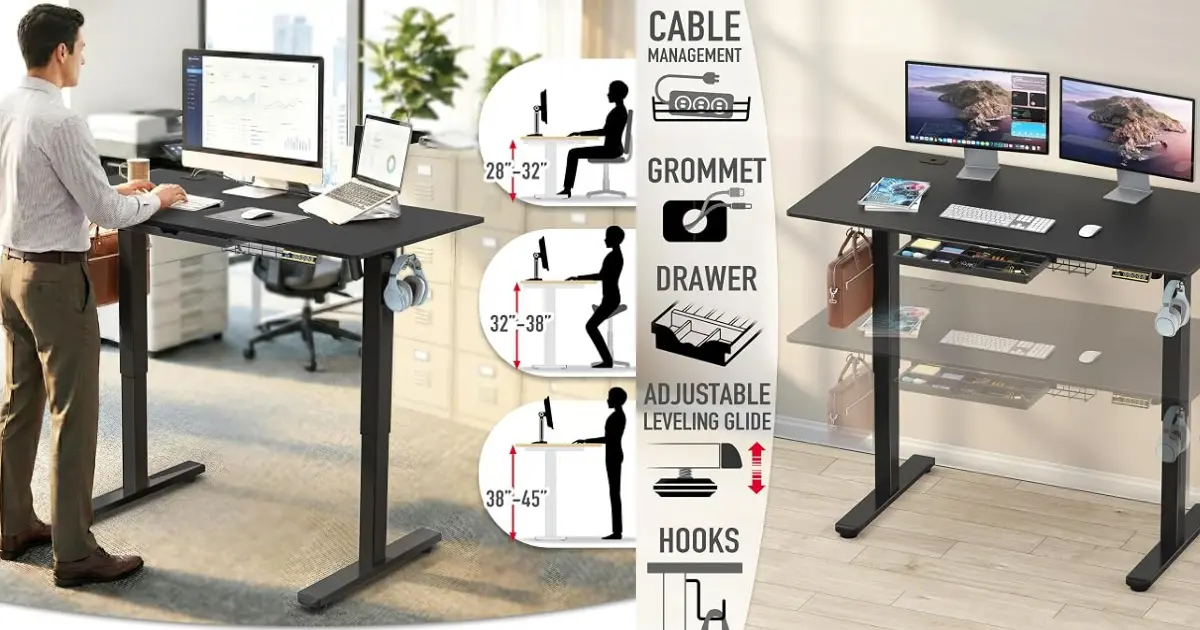
- Built-in Convenience Features: Includes integrated hooks for headphones or bags, a cable management tray, and desktop grommets to keep wires organized…
- Enhanced Stability and Comfort: Equipped with adjustable floor levellers for a stable setup on uneven surfaces and a curved edge desktop design for er…
- Quiet & Reliable Performance: Powered by a quiet, smooth motorized lift system that ensures seamless transitions between sitting and standing position…
If you’re seeking a reasonably priced sit-stand desk that has useful features such as a built-in drawer and memory settings, then the SHW 55” Electric Standing Desk is worth looking at. However, if you need room for a PC tower, plan to use heavy monitor arms, or prefer a smooth, solid desktop surface, you may be happier with a dual-motor desk.
Pros
- It’s cheap, giving you plenty of desk space for the price.
- The center drawer pulls out to hold pens, notebooks, and other small items, keeping them organized without cluttering your workspace.
- Easy memory control: With the digital LED display and four adjustable height settings, you can change the position with one touch.
- Built-in cable management: Desktop grommets help you keep your cables organized and give you a neater workspace.
- The spacious surface offers plenty of room for two computers, a laptop, and other devices.
Cons
- The maximum weight it can support is 110 pounds, which is considerably less than dual-motor desks, which can handle 220 to 330 pounds; therefore, heavy multi-monitor mounts or PC towers may exceed this desk’s weight limit.
- The desktop is multi-piece, which means that there will be seam lines on the surface.
- The adjustable height is from 28” to 45”. For people who are shorter than 6’2”, 28 inches may seem high unless a footrest is used. Those who are taller than 6’2” might find 45 inches to be low when compared with some dual-motor desks.
- When the desk is raised to its highest level and has the single-motor setup with the standard two-stage legs, it will wobble or sway slightly.
ErGear 48×24: Best for Small Home Offices
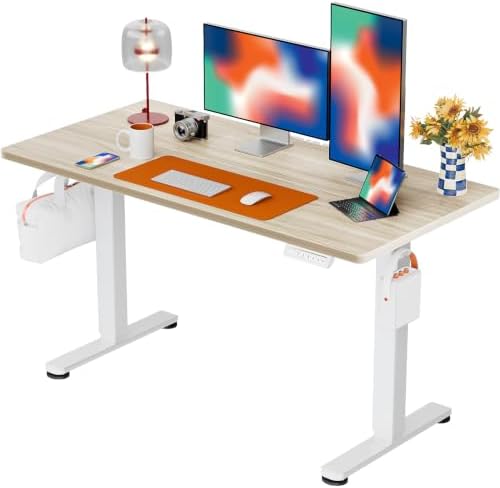
- Electric Height Adjustable Standing Desk for Comfortable Work – Switch effortlessly between sitting and standing with this electric standing desk. The…
- Powerful Motor with Memory Presets – Equipped with a quiet, powerful lift motor, this sit stand desk allows seamless adjustments at the touch of a but…
- Exceptional Stability Steel Frame – Built with a heavy-duty alloy steel frame and aerospace-grade lifting columns, this adjustable desk remains stable…
The ErGear 48” x 24” Standing Desk is a highly popular option for small home offices, bedrooms, or hybrid work environments. It strikes a strong balance of features with its 176 lb weight capacity, 4 height memory presets, and anti-collision safety, making it a great value for everyday computer work, as long as you don’t mind a spliced two-piece desktop surface.
Pros
- It’s an economical desk for folks just starting out. It has a smooth electric lift to switch between sitting and standing.
- The weight limit is 176 pounds: this desk can handle more weight than other budget models, which usually support 110 pounds or less, and can support dual-monitor arms and desktop computers.
- It features four memory settings, so you can store up to four different heights and switch between sitting and standing with one button.
- The desk includes safety features such as anti-collision detection, which stops and reverses the desk if it encounters an obstacle while moving.
- Handy accessories include two side hooks so you may hang your headphones, backpack, or bag to keep your desk surface tidy.
- The motor is quiet, with noise as low as 50 dB, so you won’t notice it adjusting the height during working hours.
Cons
- One desktop style is a spliced desktop, also called a two-piece top. It consists of 2 separate boards glued together during manufacturing. This makes a hole in the center of the desk.
- Single Motor Design Toughness is the hallmark of single-motor systems; however, they typically lift much more slowly with heavier loads than dual-motor systems.
- Minimum Height Limits for Shorter People: The lowest height setting is 28.35 inches, which may be a bit high for those under 5 feet 4 inches wanting to sit comfortably without a footrest or by adjusting the chair height.
- Compact Surface Area: Measuring 48 inches by 24 inches, it fits in small areas with no trouble. But if you have large twin Ultrawide monitors or heavy desktop accessories, it can feel a little squished.
VIVO Bamboo Corner Desk: Best for Big Setups
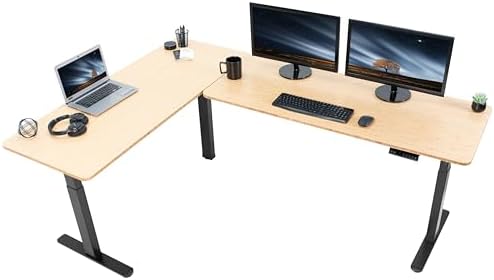
- Create Instant Active Standing: Go from sitting to standing in one smooth motion with this complete corner workstation providing comfortable viewing a…
- L-Shape with 2 One-Piece Solid Tops: Includes a spacious main desk and return desk made of scratch-resistant bamboo. When fully assembled, the outside…
- Powerful Electric Motors: Enjoy a height range of 24.4″ to 50″ with the powerful multi-motors and strong legs using precise telescopic height adjustme…
The VIVO 83” x 60” Corner Standing Desk is the ideal workstation for power users who need maximum surface area and heavy-weight support. It’s a premium product, with a triple-motor design, wide height range, and solid bamboo tops – but only if you have the space for a dedicated office and the patience to install it.
Pros
- This large L-shaped workstation has an 83-by-60-inch surface, giving you plenty of room for multiple monitors, desktop towers, printers, and other equipment. Its L-shape helps you organize your workspace efficiently.
- The desk can hold up to 300 pounds thanks to its strong steel frame. This means it stays stable, even when you place heavy equipment on it.
- You can adjust the desk height from 24.4 to 50 inches, making it comfortable for people of different heights whether sitting or standing.
- The solid bamboo tabletop is scratch-resistant and built to last. Bamboo is also an environmentally friendly choice.
- You can save up to four custom height settings with the programmable memory presets, so you can change the desk height with one touch.
Cons
- The frame has lots of legs, and the top comes in two pieces so assembly takes time. You may need to drill holes by hand in some steps to line up the frame fasteners.
- The desk comes in a few heavy boxes. The frame and tops together weigh about 100 to 150 pounds. It takes two people to move and put together.
- This desk is big, 83 by 60 inches, and takes up a lot of floor space. It works best in a corner or a large home office, so it isn’t a good fit for small rooms.
Vari Electric: Easiest to Assemble
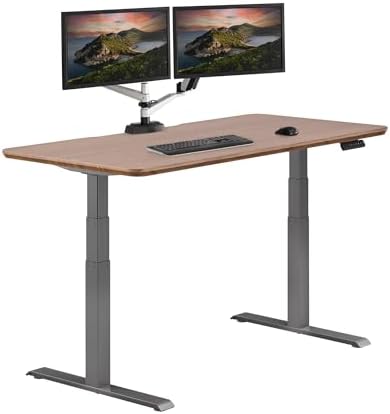
- Quick Setup – Effortless assembly with a pre-installed frame and slide-and-lock legs, ensuring your new ergonomic gaming desk is ready in under 10 min…
- Robust Construction – Elevate your workspace with our sturdier design, featuring a thick, one-piece tabletop with a durable 3D laminate finish, suppor…
- Silent Operation – Experience whisper-quiet operation with our dual-power motor, perfect for a tranquil home or office environment.
The Vari Classic Electric Standing Desk is a commercial-grade workstation built to last, ideal for those seeking a durable, stable desk that’s quick to assemble. It’s a little bit expensive it a reliable option for any home office or professional space.
Pros
- Easy Assembly: With a slide and lock leg system and pre-installed frame, the Vari desk can be assembled in less than 15 minutes using only a few simple tools.
- Sturdy & Durable: Heavy-duty steel T-style legs and a thick 1.25-inch solid desktop keeps the desk stable and steady even when it’s raised to its full height.
- Wide Height Range: The 3-stage column legs go from 25 inches to 50.5 inches so the desk is good for shorter people and those above 6 feet 3 inches tall.
- Quiet & Smooth Motors: Two individual motors raise and lower the desk fast and quiet, under 50 decibels so your work isn’t disturbed.
- User Friendly Controls: Save up to four height settings on the control panel, allowing you to switch positions with the push of one button.
- 30-Inch Deep: The desk has a wide 30-inch deep surface, giving you more space than standard 24-inch desks, so you can easily fit large monitors and other accessories.
Cons
- Premium Price Point: This desk costs a lot more than budget brands that offer simple standing desks.
- Very Heavy Unit: The desk weighs over 110 pounds so two people will be needed to turn the desk upright after assembly to prevent injury or damage.
- 200 lb Capacity Limit: The 200-pound weight limit is suitable for most office use, but it’s lower than some heavy-duty dual-motor options that support 300 to 350 pounds.
- Laminate Finish Top: The top is made of a thick, durable, and scratch-resistant laminate board, not solid natural wood.
UPLIFT V3: Best Premium / Long-Term Pick

- SEAMLESS ELECTRIC HEIGHT ADJUSTMENT: The Advanced Keypad with one-touch control and four memory presets ensures effortless transitions. This adjustabl…
- PREMIUM LAMINATE DESKTOP: This industrial desk features symmetrical patterns and consistent colors with a water, stain, and scratch-resistant laminate…
- DUAL GERMAN MOTORS: Dual German-made motors provide smooth, fast, and quiet adjustments (under 48 dB). Three-stage legs enable 33% faster movement and…
The UPLIFT V3 Walnut Laminate Standing Desk is known for its stability, ergonomic design, and wide range of height adjustments. For the pros wanting commercial-grade stability with easy-care laminate looks, it’s a solid long-term option with a high weight capacity and a 15-year warranty.
Pros
- The desk height is from 22.6 inches up to 48.7 inches so people from 5’0″ to 6’4″ can use it without a special frame.
- Stable design: The V3 frame has beefier steel feet, stability plates and two I-beam crossbars that prevent it from shifting from side to side when you stand.
- Powerful load capacity: The two electric motors are capable of supporting up to 355 pounds, including several monitors, desktop PCs, speakers and other equipment.
- Walnut finish: High pressure laminate looks like real walnut and is tough against scratches, spills and normal wear and tear. It also requires less maintenance than solid wood.
- The frame has more than 48 built-in mounting points, making it easy to add cable trays, power strips, and other under-desk accessories. You don’t even need to punch holes.
- It has built in cable management. FlexMount PET cable manager and wire plugs keep your cords organized and out of the way.
Cons
- Desk price may increase with add-ons. You get a competitive base price, but add extras such as upgraded memory keypads, power grommets, drawer units, or caster wheels, and the total cost soon mounts up.
- The desk comes in several heavy boxes, weighing well over 120 to 140 pounds. You’ll need a couple of people to lift it and set it up safely.
- The desktop isn’t solid wood. It has a dense core board with a high-quality walnut laminate. If you want real wood grain or a live-edge look, you should check out UPLIFT’s solid wood options.
Ranking Methodology
To rate these desks, we considered public manufacturer specs, independent reviews, hands-on testing data from trusted sources, ergonomics recommendations, features, current prices, and overall value. We haven’t tested every model ourselves. When sources disagreed, particularly in the height ranges where ‘frame only’ and ‘with desktop’ numbers get confused, we reported the disagreement rather than picking a number at random.
Criteria weighted most heavily:
- Stability at full height is the primary factor that distinguishes a desk that feels high-quality from one that feels flimsy.
- Height range vs. price is important. Once you know your actual usable height a wider range is more valuable (see below buying guide).
- Capacity to weight (of your actual setup) is important. Many buyers don’t realize how heavy their monitors and arms are.
- Look at warranty length and coverage. If your motor fails after five years and is not covered, this can be expensive.
- Value relative to the desk’s target use case, not just raw price
How to Choose the Best Standing Desks
Before you look at price, make sure the desk fits your needs, your gear, and your room.
- When you stand, your desk should be at arm height, which for most people is between 38 and 44 inches. Make sure it’s low enough for you to sit comfortably, especially if you share the desk or are short.
- 48 to 55 inches works for one computer, 55 inches or more works for two, and 60 to 72 inches works for creators and developers with extra gear.
- Check for wobble at full height (or read reviews) to make sure it is stable. Most of the time, dual-motor frames are more stable and are the best way to tell a $200 desk from a $500 one.
- How much weight can it hold? Add up the weight of your PC, monitors, arms, and other items. Get bigger if you think you’re about to go too far.
- Motor noise, memory settings, and noise: Two motors make lifting and carrying faster. Quiet motors are important for video calls and thin walls. Saved memories are helpful if you share a desk.
- To keep cords from tangling, use a cable tray. Laminate is the least expensive and lasts the longest. Bamboo looks better but costs more, and real wood is the best.
- Warranty and setup: Make sure the frame, motor, and electronics are covered. Assembly can take anywhere from 15 minutes (for quick-attach) to 60-90 minutes.
- For a quick setup, keep your arms close to 90°, the top of the monitor at or just below eye level, and your wrists straight. If you don’t want to stand all day, switch positions often. If you do have to stand a lot, add a supportive mat and shoes. This is NOT medical advice; it’s just general ergonomic advice.
- The biggest mistakes people make are buying only based on price, not considering height range and stability, picking a top that is too small, not checking whether it works with their monitor arm and warranty, and spending money on extras like RGB or speakers.
Read our standing desk buying guide for a full list.
Standing Desk vs. Regular Desk vs. Converter
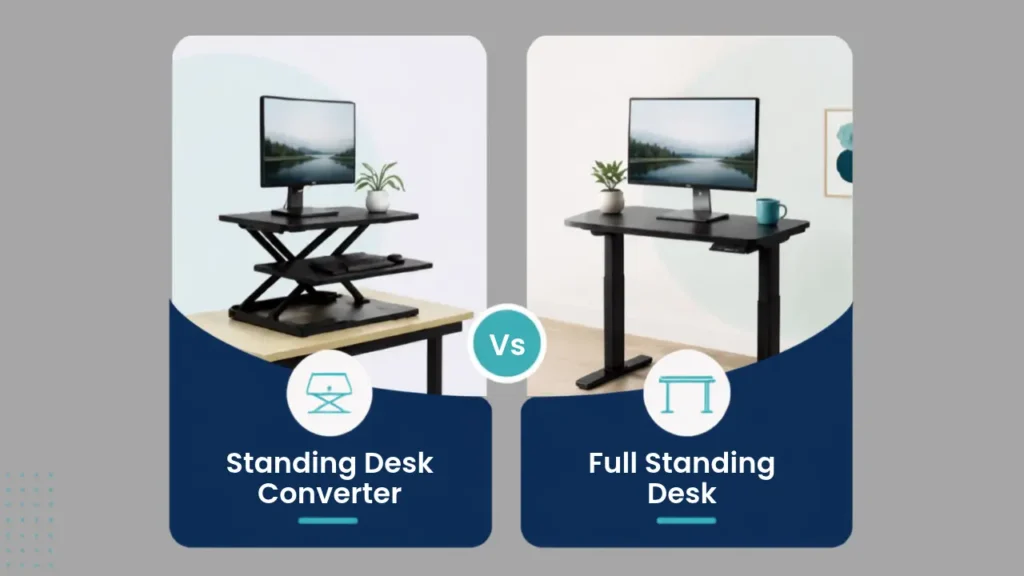
A standing desk converter sits on your existing desk and only raises your monitor and keyboard. It’s less expensive and lets you try standing while you work without buying new furniture. A full standing desk is usually more stable, neater, and gives you more space, but it costs more and requires replacing your desk. If you are unsure about standing desks then a converter is a good way to try them out before making a bigger purchase.
You need to balance desk features with other key items like monitors, lighting and cable management, so a little planning goes a long way. Want to choose the right gear for your budget? Check out our Ultimate Guide to Building a Remote Job Setup (2026).
Sources / References
- Manufacturer product pages: FlexiSpot (flexispot.com), Fully/Jarvis (fully.com, store.hermanmiller.com), UPLIFT Desk (upliftdesk.com), Vari (vari.com), SHW Desks (shwdesks.com), ErGear listings (Amazon, Walmart, Target)
- Independent reviews and comparisons: Tom’s Guide standing desk reviews, standingdeskpicks.com, standdesklab.com, remoteofficeguy.com, magneticmag.com, theworkmedic.com
- OSHA Computer Workstations eTool (osha.gov/etools/computer-workstations) and general OSHA ergonomics guidance
- ANSI/BIFMA G1 ergonomic guideline references (cited via manufacturer and industry sources)
- Peer-reviewed ergonomics research on sit-stand workstation posture (Black, Fortin & Handrigan, 2015; King, 2002) as referenced in worksmarthub.com’s evidence-based sit-stand guide
FAQs
Are standing desks actually worth it?
The main practical advantage for most people who sit at a desk for long hours is that they can change position during the day. It also gives you more flexibility for different tasks and poses.
What is the best standing desk for working from home?
Based on your budget and setup you can choose from: The FlexiSpot E6 is the best choice for most home offices because it’s stable, spacious and affordable. If you want the fastest motors and the longest warranty, choose the UPLIFT V3.
How much should I spend on a standing desk?
You can buy a decent electric standing desk for a single monitor for anywhere between $200 and $350. If you have two monitors or a heavier setup, there’s some value in spending $350 to $600 or more on a sturdier frame that can handle the added weight.
What is the ideal standing desk height?
Stand relaxed with your arms down and try to get your desk height in line with your relaxed elbow height. This can vary from person to person so rather than looking for one ‘golden’ number, look for a desk that has a height range that feels comfortable.
Are dual-motor standing desks better?
Yes, generally dual motor desks are more stable and can take more weight and uneven loads like a monitor arm. But for simple, light setups, single-motor desks are still a good bet.
What is the best standing desk for tall people?
Choose a desk with a higher max height. Both the UPLIFT V3 and Fully Jarvis (in extended-range configuration) go higher than most budget models.
What is the best standing desk for short people?
It’s better to focus on a desk with a low minimum height than a high maximum. For example, the FlexiSpot E6 has a minimum frame height of 22.8 inches, which is lower than most of the options here. Fits your height. Make sure

Hi, I am Jiyauddin. Freelance veteran with 20+ years of experience across computer operations, graphic design, and digital marketing. At GearForRemote.com, I share actionable guides, tech reviews, and proven workflows to help remote workers elevate their digital productivity.