
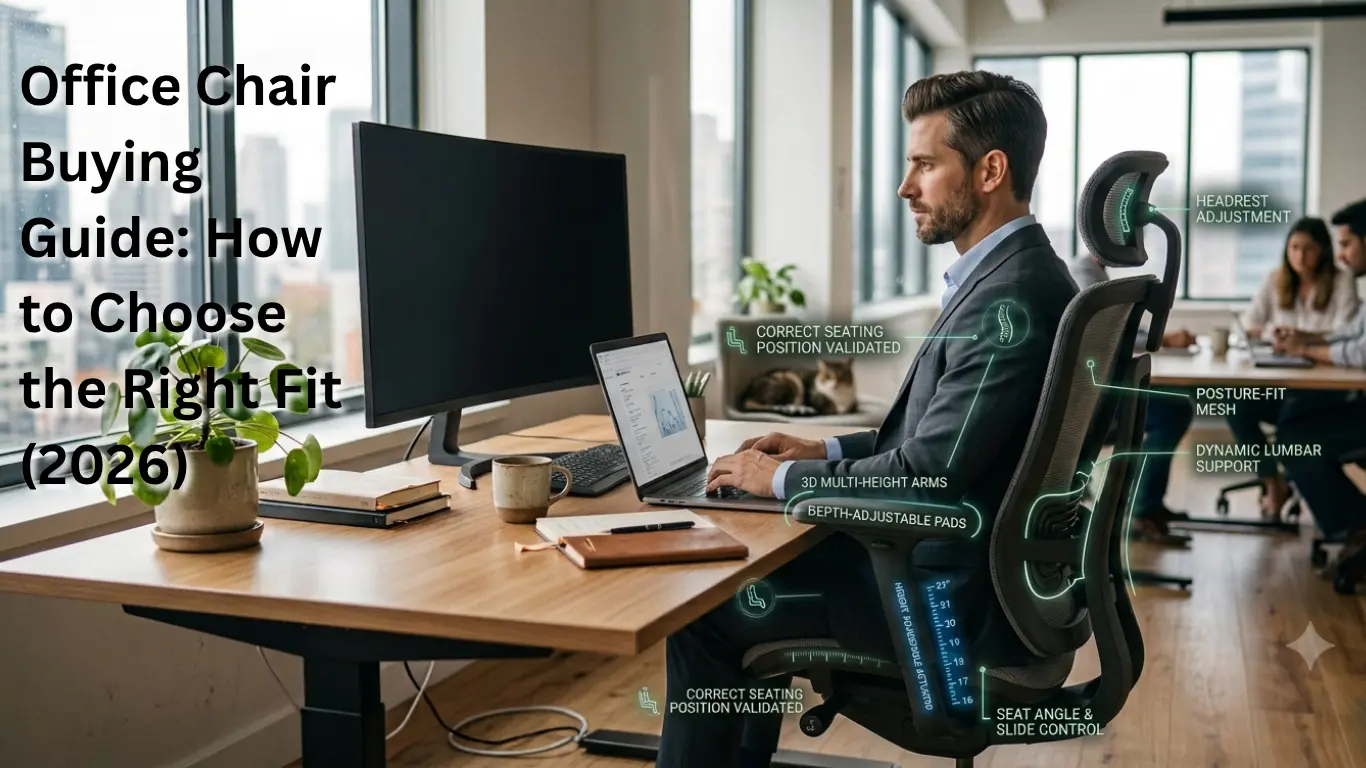
You finally have the desk you wanted. The monitor is at eye level, the keyboard is mechanical and satisfying, and the webcam makes you look like you have your life together. Then, three hours into a Tuesday, your lower back starts complaining, and you realize the chair underneath you, the thing you actually sit on for eight or nine hours a day was an afterthought.
That’s the trap with office chairs. They all look reasonably similar in a product photo. Mesh back, some levers, a swivel base. But two chairs with nearly identical spec sheets can feel completely different once you’re in them for a full workday, because the thing that actually matters isn’t the feature list; it’s whether the chair fits your body and your work habits.
This office chair buying guide isn’t going to hand you a “10 best chairs” list and call it a day. Instead, it walks through exactly what to check, measure, and test so that when you’re standing in a showroom or scrolling through listings at midnight, you know what you’re looking at and what you’re actually paying for.
Table of Contents
Quick Answer: What Should You Look for in an Office Chair?
If there is one thing to remember when buying an office chair, it is that comfort matters more than the number of features. A $900 chair that doesn’t suit your height and desk setup can be worse than a $250 chair that fits you perfectly. With that in mind, here are the factors that truly matter:
- Seat height that lets your feet sit flat on the floor with your desk
- Seat depth that leaves a few finger-widths of space behind your knees
- Adjustable lumbar support that lands on your actual lower back, not your mid-back
- Adjustable armrests — capable of height adjustment, as well as width and pivot adjustments.
- A backrest and seat cushion designed for long-term comfort, not just for the initial period of use.
- A recline mechanism that allows you to shift positions rather than keeping you locked in a single posture.
- A sturdy five-point base equipped with casters (wheels) suitable for your flooring; the weight capacity and seat width should be comfortable for your body type.
- Material that adapts to room temperature and suits the way you use the upholstery (seat cover/cushioning).
- A warranty and return window long enough to actually test the chair in real use
We’ll go through each of these in detail, but if you’re short on time, that list is your shopping checklist.
Start With Your Body and Work Habits
Before you look at a single chair listing, figure out a few things about yourself. This sounds almost too basic to mention, but skipping it is the single most common reason people end up unhappy with an expensive chair.
Roughly Note:
- Your height, and whether you fall outside the “average” 5’4”–6’0” range many mainstream chairs are designed around
- Your seated leg length (hip to the back of your knee), which determines seat depth
- Your hip and shoulder width, which affects seat width and armrest spacing
- How many hours a day you’re actually sitting, not how many hours you’re “at your desk” while also pacing during calls
- Your typical posture — do you lean back to think, hunch forward to type, or shift constantly?
- Your desk height, since a chair has to work with your desk, not just on its own
A chair engineered around an average adult male frame, which is still common in office furniture design may fit one person in your household perfectly and feel wrong for another. None of this is about finding a universally “correct” chair. It’s about narrowing down which adjustments matter most for your specific body and day.
Read more : Our complete home office setup checklist
Office Chair Features That Actually Matter
Seat Height
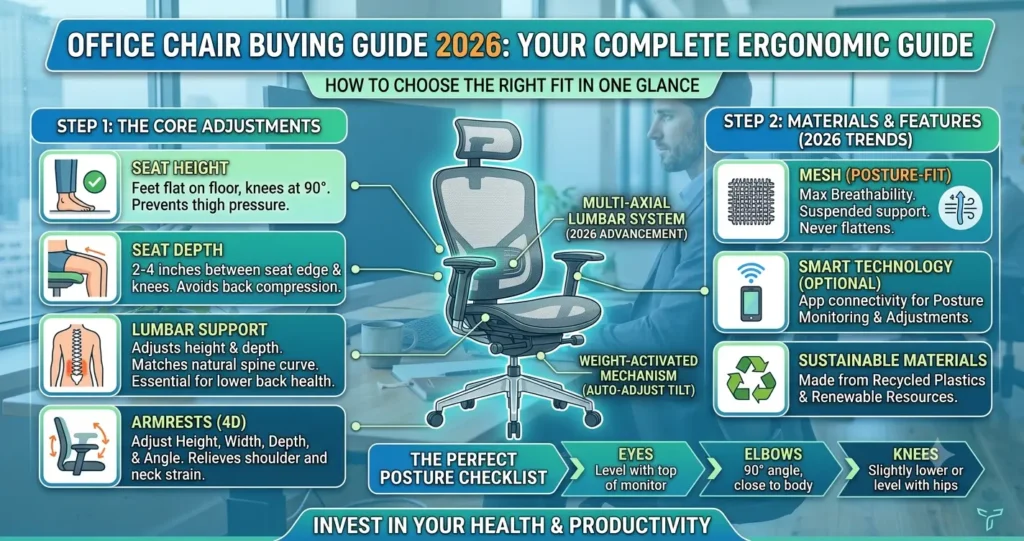
Your feet on the floor (or on a footrest), knees bent at about a 90-degree angle. What should your desk height be? Your desk should be high enough so that your forearms are almost level when you are typing. According to the Occupational Safety and Health Administration, this foot and knee alignment is the beginning of a comfortable computer workstation.
Spec sheets will say something is “height adjustable,” but the range is what counts. A chair can be anywhere from 17” to 21”, which is fine for the average adult but leaves shorter or taller users perched at the top or bottom of the range, unsupported. If you’re under 5’4 or over 6’2, check the exact seat height range with your desk height before you buy, not after.
Depth of Seat
Seated depth, the distance from the backrest to the front edge of the seat at the knees, is often overlooked.
If the seat is too deep for your leg length, you’ll either be sitting with your lower back away from the lumbar support (so it’s doing nothing), or you’ll feel pressure behind your knees, which constricts circulation and gets uncomfortable quickly. Too shallow a seat won’t give enough support to your thighs, and the front edge can dig in.
A simple fit check: sit all the way back so your spine touches the backrest. You should be able to fit roughly two to four finger-widths between the front edge of the seat and the back of your knee. If you can’t, or if there’s a large gap, seat depth adjustment (a sliding seat pan) is worth prioritizing over almost anything else on the spec sheet.
Lumbar Support
Lumbar support is a pad or curve in the backrest that fills the natural inward curve of the lower back. Good lumbar support can help maintain that curve and prevent slouching. Many of the ergonomics guidelines from OSHA and university occupational health programs cite this as a comfort factor for long sitting sessions.
Look for:
- Height adjustment — so the support lands on your actual lower back, not your mid-back
- Depth adjustment — how far the pad projects forward
- Fixed vs. adjustable lumbar — fixed lumbar support can work fine if it happens to match your torso length, but adjustable support gives you a much better shot at a correct fit
More aggressive lumbar support isn’t always better. An exaggerated lumbar bulge can be uncomfortable for some, especially at first. This is one feature you really need to sit in and get used to, not judge it from a spec sheet.
Backrest and Recline
A good backrest supports both upright, focused work and the moments where you lean back to think or take a call. Terms you’ll run into:
- Tilt tension — how much resistance there is when you recline, usually adjustable with a knob under the seat
- Tilt lock — the ability to lock the backrest at a fixed angle instead of always being able to recline
- Synchro-tilt — the backrest and seat move together at a linked ratio as you recline, so your feet stay grounded, and your view doesn’t tip upward
- Multifunction mechanisms — combine tilt, tilt lock, seat slide, and sometimes forward tilt in one control system
Being able to shift position throughout the day, rather than staying rigidly upright, is generally considered preferable to a completely fixed posture — though this is about comfort and movement, not a guaranteed fix for back pain.
Armrests
Armrests matter more than most people expect, mainly because badly positioned ones force your shoulders into an awkward, elevated position for hours at a time. Relevant adjustments:
- Height — should let your shoulders stay relaxed and your elbows close to your body, roughly matching your desk and keyboard height
- Width — narrower or wider spacing to match your shoulder width
- Depth — how far forward or back the pad sits
- Pivot — whether the armrest angles inward or outward
- Padding — firmness and material, which affects comfort during long typing sessions
If armrests are fixed and too high, they’ll push your shoulders up. Too low, and you’ll lean to one side. Also check that the armrests actually fit under your desk — a common and annoying mistake is buying a chair with great armrests that can’t slide under your desk surface.
Seat Cushion
The cushion material is a huge part of how comfortable a chair is, both when you first sit down and after a few hours. For example, you’ll find high-density foam, layered foam, and mesh seat pans. But a softer cushion isn’t always the best answer. A seat that feels soft and comfortable for a few minutes in a store might lose its support over the course of a long workday. Meanwhile, a firmer cushion with even support tends to remain comfortable longer. Choose a chair with a “waterfall” curved front edge instead of a sharp edge to avoid pressure on the back of your knees.
Chair Base and Casters
An office chair must have a five-legged base. OSHA’s workstation guidance mentions this stability requirement, and it’s standard on virtually every legitimate office chair available today. Otherwise, look:
- Caster type — soft casters for hard flooring, harder casters for carpet (using the wrong type on the wrong floor either damages the floor or makes the chair hard to roll)
- Swivel quality — should rotate smoothly without catching
- Floor protection — some casters are designed specifically to avoid scuffing hardwood or tile.
Headrest
A headrest supports your head and neck when you recline, which is genuinely useful if you spend meaningful time leaned back on calls or reading. If you sit upright and engaged with your screen most of the day, a headrest may get in the way or sit unused. It’s a nice-to-have for some work styles, not an essential feature for every desk worker.
Mesh vs. Fabric vs. Leather
There’s no universally superior material — each comes with trade-offs.
| Material | Pros | Cons | Best For |
| Mesh | Breathable, lighter feel, holds up well in warm rooms | Quality varies a lot between brands; frame and tension design matter as much as the mesh itself | Warm climates, hot-running home offices, long sitting sessions where airflow matters |
| Fabric | Soft, wide range of colors and textures, often comfortable for extended sitting | Can retain body heat, may stain more easily, harder to clean than leather | People who prioritize a softer feel and don’t mind occasional spot-cleaning |
| Leather / Faux Leather | Polished appearance, easy to wipe clean, common in executive-style chairs | Can feel warm against skin in summer; cheaper faux leather may crack or peel faster than mesh or fabric wears out | Home offices used on video calls often, or households prioritizing easy cleanup over long-hour breathability |
If you tend to get warm, work long hours, or live in a place without reliable air conditioning, mesh is usually the safest choice. If you care about how your chair looks on video calls, leather or faux leather looks good on camera. Fabric falls somewhere in the middle, so it really comes down to what you like best, not performance.
Choose a Chair Based on How You Work
If you spend 2 to 4 hours a day working
A good budget chair with simple height adjustment and decent padding is usually enough. You do not need advanced lumbar support or adjustable armrests if you are not sitting for a full workday.
If you work 6 to 10 or more hours a day
An adjustable chair matters. Features like seat depth, adjustable lumbar support, armrest range, and a tilt mechanism become valuable, since small misalignments add up over a long workday.
If you often lean back for calls or reading
Look for a chair with tilt lock, a comfortable headrest, and a recline that lets you really relax, not just lean back a little.
If you spend most of your day typing
Make sure the armrest height and position are your top priorities. When you type a lot, your shoulders and wrists suffer most from poor armrest setup, even more than your lower back.
If you alternate between sitting at a desk and using a standing desk
Check that your chair’s seat height and your standing desk’s lowest setting match up. It might seem simple, but many standing desks don’t go low enough for shorter chairs, and some tall chairs don’t go low enough for a desk set up for a shorter person.
Office Chairs for Different Body Types
Short users (generally under about 5’4”)
- Check the minimum seat height, not just the maximum — many chairs don’t go low enough
- Confirm seat depth isn’t too long for your leg length; a seat slider helps a lot here
- A footrest may still be necessary even with a correctly adjusted chair
- Armrests need a low enough minimum height to avoid shoulder shrug
Tall users (generally over about 6’2”)
- Check the maximum seat height and confirm it clears your desk comfortably
- Look for a taller backrest that actually supports your upper back and shoulders
- Confirm seat depth extends far enough, or that it’s adjustable
- Armrest height range needs enough room at the top of the scale
Larger users
- Seat width matters as much as seat depth — a narrow seat pan can be uncomfortable regardless of cushioning quality.
- Check the chair’s rated weight capacity against the manufacturer’s specification, not a general assumption.
- Standard “general-purpose” office chairs are typically tested and rated for occupants up to around 275 lbs under ANSI/BIFMA X5.1; chairs built and tested to the separate ANSI/BIFMA X5.11 standard are designed and rated for significantly higher capacities, so it’s worth confirming which standard a specific chair was tested against
- Reinforced frames and wider bases are common in chairs designed for higher weight capacities.
Body type isn’t reliably predictable from height alone, so treat these as starting points for what to check, not assumptions about which chair “type” someone needs.
How Much Should You Spend on an Office Chair?
Office chair pricing shifts constantly with sales and new product cycles, so treat the numbers below as general 2026 market bands rather than fixed prices.
| Budget | What You Can Reasonably Expect | Best For |
| Under $150 | Basic height adjustment, fixed or flip-up arms, single recline setting, often lower-durability materials | Occasional or part-time use, secondary workstations, tight budgets |
| $150–$300 | Adjustable lumbar support becomes more common, better mesh quality, sometimes a seat slider | Daily use on a moderate budget, most home offices |
| $300–$600 | Independent lumbar adjustment, 3D or 4D armrests, seat-depth slide, sturdier bases and casters | Full-time remote workers, 6+ hour sitting days |
| $600–$1,000+ | Synchronous tilt with weight-sensing recline, premium materials, longer warranties, replaceable components | Long-tenure home offices, users who’ve identified specific ergonomic needs |
| $1,000+ | Industry-standard ergonomic seating from brands like Herman Miller and Steelcase, extensive fine-tuned adjustability, 10-plus-year warranties in some cases | Users prioritizing longevity and maximum adjustability, or those with specific comfort requirements a cheaper chair hasn’t solved |
A more expensive chair is not necessarily a better fit for you. A $1,000 chair that doesn’t have the right seat width or armrests for you isn’t automatically better than a $300 chair that does. Verified market data on chair prices shows you can buy real ergonomic chairs with adjustable lumbar support for far less than $200. Premium brands cost more because they use better materials, have longer warranties, and last longer. Most of the time, there isn’t a huge difference in how well they fit everyone. Buy features that address your fit problems. Don’t assume that paying more means you’ll get a better fit.
Read more : Our Home Office Budget Planning Guide
What Does a Good Office Chair Warranty Look Like?
Warranty length is a decent proxy for how confident a manufacturer is in their build quality. Still, the specifics matter more than a marketing phrase like “premium warranty.” Before buying, check:
- Length of coverage — budget chairs often run 1–3 years, mid-range chairs 3–5 years, premium chairs sometimes 10-plus years
- What’s actually covered — frame, mechanism, cylinder, casters, and upholstery are sometimes covered differently, with upholstery frequently getting shorter coverage.
- Exclusions — normal wear and tear, commercial use of a residential-rated chair, or user modifications are common exclusions
- Return period — separate from warranty, this is your window to sit in the chair and send it back if it doesn’t fit.
- Return shipping costs — some retailers cover return shipping on furniture, others don’t, and chairs are heavy enough that this matters.
Read the actual warranty document rather than relying on the summary line on the product page.
How to Test an Office Chair Before Buying
When you can, try to sit in your chair for a few minutes instead of just a few seconds. Ask yourself:
- Can you rest both feet flat on the floor or on a footrest?
- Is your chair height comfortable when you sit at your desk, not just on its own?
- Is there appropriate space behind your knees at the correct seat depth?
- Does lumbar support land on your lower back rather than your mid-back?
- Can your shoulders stay relaxed with the armrests at your typing height?
- Are your elbows comfortable and close to your body?
- Does the chair recline smoothly, without excessive resistance or looseness?
- Is the seat edge pressing uncomfortably behind your knees?
- Can the chair fit under your desk when the armrests are attached?
- Do the wheels roll smoothly on your type of flooring?
- Does the chair still feel supportive after 20 to 30 minutes, or just at first?
OSHA’s ergonomics guidance specifically recommends trying out chairs to check comfort and fit before committing to one, when that option is available.
For online purchases where an in-person test isn’t possible, lean on:
- Return windows — buy from retailers with generous furniture return policies.
- Trial periods — some direct-to-consumer chair brands offer 30-plus-day trials specifically because chairs are hard to judge from photos.
- Verified measurements — compare the manufacturer’s exact seat height, depth, and width ranges against your own body measurements and desk
- Customer reviews, read carefully — look specifically for reviewers who mention their height and how the chair fit them, rather than generic star ratings.
Office Chair Buying Mistakes to Avoid
- Buying a chair just because it looks good in a product photo can cause problems if it doesn’t fit your body well.
- The cheapest chair might work for occasional use, but if you use it all day, its flaws will show quickly.
- Ignoring seat depth — the most commonly overlooked measurement, and one of the most impactful
- Assuming “ergonomic” on the label means it will fit everyone — ergonomic design still has to match your specific proportions.
- Buying without checking dimensions against your own body and desk
- Ignoring weight capacity, especially for larger users or people planning to use the chair for many years
- Overweighting headrests in the decision when they may not even suit your work style
- Choosing fixed armrests without checking desk height compatibility first
- Ignoring warranty and return policy until after the chair arrives and doesn’t fit
- Skipping desk compatibility checks — seat height range needs to work with your actual desk, not a generic “average” desk height
- Confusing ANSI/BIFMA testing with a guarantee of personal ergonomic fit — it verifies durability and safety, not that a chair suits your body.
- Assuming expensive automatically means comfortable for you specifically, rather than for the “average” body the chair was designed around.
Read More : Common Home Office Setup Mistakes
Office Chair Buying Checklist
Fit
- Make sure the seat height works for both your legs and your desk
- Check that the seat depth leaves enough space behind your knees
- The seat should be wide enough for your body
- Your feet should rest flat on the floor or a footrest.
Ergonomics
- The lumbar support should fit the curve of your lower back
- Armrests need to adjust to your typing height and shoulder width
- The backrest should recline easily, with tension you can change
- The seat cushion should still feel comfortable after 20 minutes.
Build
- Look for a stable five-leg base
- Make sure the wheels work well with your floor
- The chair should support your weight
- Choose materials that fit your room and how you’ll use the chair.
Buying
- Read & understand the return policy
- Learn what is and what isn’t covered by the warranty
- Make sure the chair is the right size for your desk and your body
- Compare prices of chairs in the same category that meet your needs.
Conclusion
No matter the evaluation, no office chair is perfect for everyone. A good chair lets you adjust it easily so you can change positions throughout the day. It should have seat height and depth that let you sit comfortably and support your lower back where your spine curves. You will also need armrests that let your shoulders relax while you work.
Feature lists and price tags are useful starting points, but they’re not substitutes for actually checking fit. Before you buy your next chair, or decide whether to keep the one you already own, run it through the buying checklist above. It takes five minutes, and it’s a lot cheaper than a chair that ends up in the garage after two months.
Sources & References
- Occupational Safety and Health Administration — eTools: Computer Workstations, Chairs
- Oregon OSHA — Evaluating Your Computer Workstation
- National Institutes of Health, Division of Occupational Health and Safety — Computer Workstation Ergonomics Self-Assessment Checklist
- BIFMA / ANSI-BIFMA X5.1 standard overview — Bevco: What Is ANSI/BIFMA Certification?
- ANSI/BIFMA X5.1 and X5.11 standard scope — Micom Laboratories: ANSI/BIFMA X5.1 General Purpose Office Chairs Tests
- ANSI/BIFMA standards explainer for buyers — Eureka Ergonomic: BIFMA Standards for Office Seating Buyer’s Guide
- Office chair market pricing tiers, 2026 — Ergoprise: How Much Do Office Chairs Cost in 2026?
- Verified office chair pricing data, 2026 — Office Chair Price Index, July 2026
- Product testing and buying guidance — Tom’s Guide: Best Budget Office Chairs of 2026
FAQs
What is the most important feature of an office chair?
There isn’t one universal answer, but seat depth and adjustable lumbar support are the two most commonly overlooked features that make the biggest difference in daily comfort, since they directly affect whether the rest of the chair’s ergonomics can actually reach your body correctly.
Is lumbar support really necessary?
It’s not strictly necessary for everyone, but for most people sitting six or more hours a day, adjustable lumbar support helps maintain a more supported seated posture. It’s not a guaranteed fix for back pain and shouldn’t be treated as medical treatment.
Is mesh better than leather?
There isn’t a universally applicable answer. Mesh is more breathable, so it’s better for warm rooms or long hours. Leather is easier to clean and looks more refined, but can feel hotter.
What would you pay for a decent office chair?
If you’re using your chair every day, you can cover most ergonomic needs with a budget of $150-$400. The more you pay, the better the materials, the more adjustments you get, and the longer the quality lasts. But that doesn’t always mean the chair will suit you better.
What seat depth should an office chair have?
It depends on your leg length rather than a single universal number — the fit check is a two-to-four finger gap behind your knees when you’re sitting fully back, not a specific inch measurement that works for everyone.
Are expensive office chairs worth the money?
In some cases, yes—mainly if you need a chair that will last a long time, offers lots of adjustments, or comes with a strong warranty. Still, if an expensive chair doesn’t fit your seat depth or armrest needs, it isn’t necessarily better than a mid-range chair that fits you well.
What is ANSI/BIFMA?
ANSI/BIFMA X5.1 is a voluntary American standard developed by the Business and Institutional Furniture Manufacturers Association. It tests general office chairs for safety, strength and durability. But it doesn’t tell you how well a chair will work for you personally.
Is a headrest necessary?
No, it’s useful if you recline often for calls or reading, but not essential if you sit upright and engaged with your screen most of the day.
How long should an office chair last?
Many office chairs, particularly mid-range and premium models, are designed to last several years under regular single-shift daily use. However, actual longevity depends heavily on materials, usage, and maintenance.

Hi, I am Jiyauddin. Freelance veteran with 20+ years of experience across computer operations, graphic design, and digital marketing. At GearForRemote.com, I share actionable guides, tech reviews, and proven workflows to help remote workers elevate their digital productivity.