
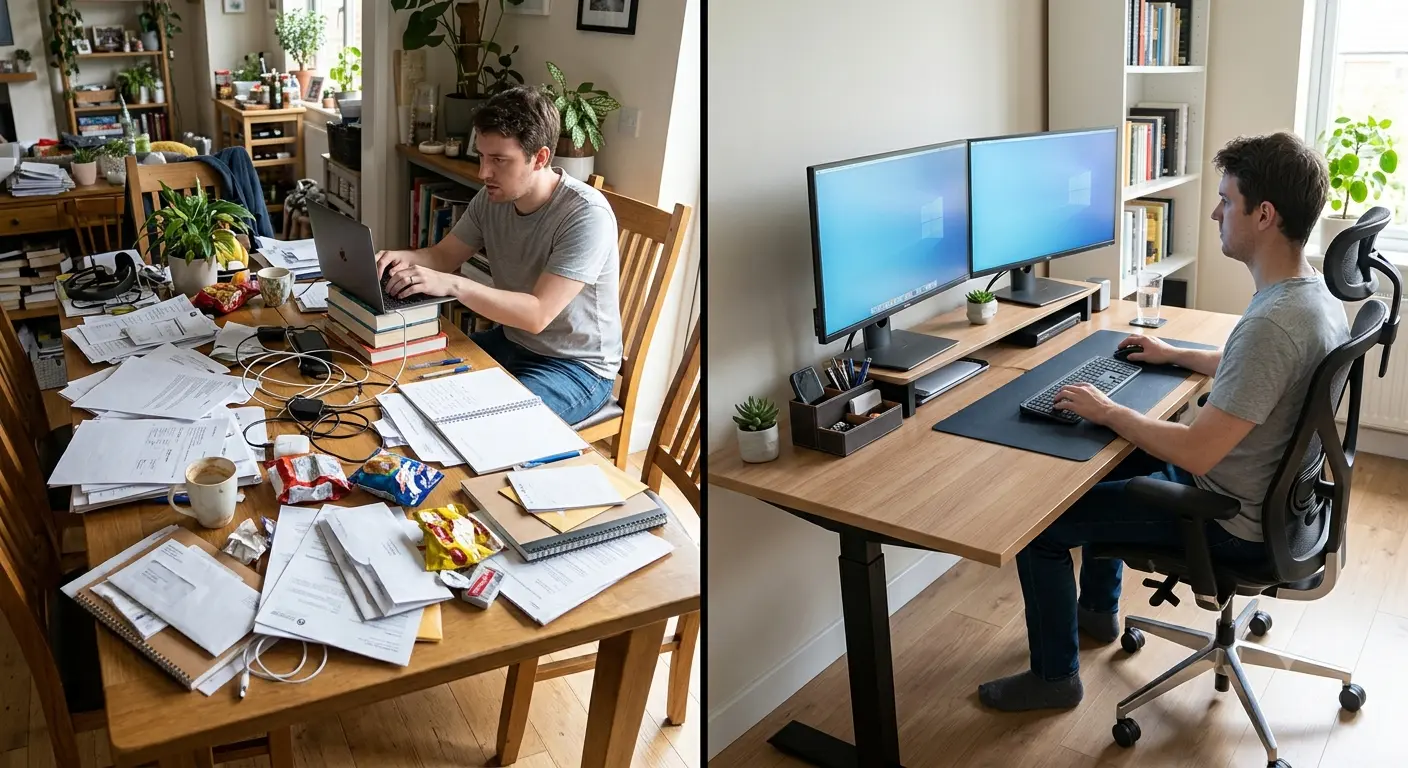
If you’re setting up a home office right now, or fixing one that’s been quietly wrecking your back for months, you’re in the right place. This guide walks through the most common home office setup mistakes to avoid, why they happen, and what to do instead; no fluff, just what actually works.
Quick answer: The most common home office setup mistakes to avoid include ignoring ergonomics, working from a dining table long-term, choosing a cheap chair, poor monitor height, bad lighting, and skipping movement breaks. Most of these are easy and inexpensive to fix once you know what to look for.
Table of Contents
Why Your Home Office Setup Matters
It’s tempting to treat a home office as an afterthought; just grab a laptop, sit on the couch, and call it a day. I did exactly that for the first three months of working remotely, and I paid for it with tension headaches and a stiff lower back by 2 p.m. every single day.
Your setup affects more than comfort. It makes:
- Productivity: It’s harder to concentrate for long periods of time in a messy or uncomfortable area.
- Incorrect monitor height and bad posture can cause neck, shoulder, and hand pain over time.
- Mental health: a messy workspace can make you feel more stressed, even if you’re not aware of it.
- Pay attention: mess, background noise, and stare are all trying to get your attention.
- Professional performance: being in a place that isn’t conducive to deep work, video calls, or meeting deadlines is tough.
The good news is that fixing a home office doesn’t require a total renovation. Most of the mistakes below can be corrected in an afternoon, often for less than the cost of a nice dinner out.
For a broader walkthrough of building a workspace from scratch, our Ultimate Guide to Building a Remote Work Setup covers the full process step by step.
12 Home Office Setup Mistakes to Avoid
1. Ignoring Ergonomics
- Why people make this mistake: Ergonomics sounds like a corporate buzzword, so a lot of people assume it doesn’t apply to their kitchen-table setup at home.
- Why it causes problems: Your body doesn’t know the difference between a corporate office and your spare bedroom. Bad posture is bad posture, and it adds up.
- Simple solution: Start with the basics; feet flat on the floor, elbows at roughly 90 degrees, screen at eye level.
- Best practice: According to general workplace health guidance from organizations like OSHA and NIOSH, small ergonomic adjustments made consistently tend to matter more than one expensive piece of furniture.
- Common misconception: People think ergonomics means buying gear. Often it just means adjusting what you already have.
- Pro Tip: Take five minutes today to check your elbow angle and screen height before buying anything new.
2. Using the Dining Table Permanently
- Why people make this mistake: It’s already there; it’s flat, and when I first started working from home, it seemed like a short-term fix.
- Why it causes problems: Dining tables are usually too high for typing comfortably, and dining chairs rarely offer back support.
- Simple solution: If a dedicated desk isn’t possible yet, add a cushion to raise your seat height and bring your elbows closer to that 90-degree angle.
- Best practice: Treat the dining table as a short-term fix, not a permanent workspace; even a basic $80 desk changes the equation.
- Common misconception: Most people think that any flat area will do. It’s not just the surface that matters; the height and chair support are also important.
3. Buying the Cheapest Office Chair
- Why people make this mistake: There are real money limits, and shots of chairs together can look good.
- Why it causes problems: If your chair doesn’t have lumbar support or a height adjustment, your body has to make up for it, which can hurt your lower back.
- Simple solution: Prioritize adjustable seat height and some form of lower back support over aesthetics.
- Best practice: You don’t need a $900 chair; a mid-range chair with adjustable height and lumbar support covers most people’s needs. Our Best Ergonomic Office Chairs guide breaks down solid options at different budgets.
- Common misconception: More expensive always means better for your body. Not always; function is more important than price tags.
4. Poor Monitor Position
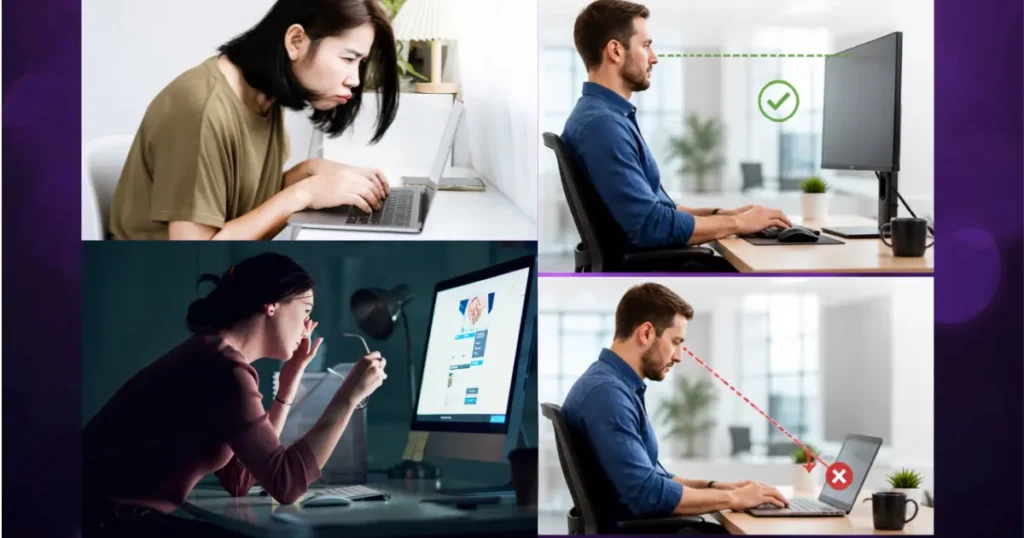
- Why people make this mistake: Laptops are portable by design, so people often just use them as-is, screen tilted down on a desk.
- Why it causes problems: A screen positioned too low forces your neck into a forward tilt for hours at a time; sometimes called “tech neck.”
- Simple solution: The top of your screen should sit roughly at eye level, about an arm’s length away.
- Best practice: A laptop stand paired with an external keyboard and mouse is one of the cheapest upgrades you can make.
- Common misconception: People think monitor height only matters for desktop setups; it matters just as much, if not more, for laptops.
5. Bad Lighting
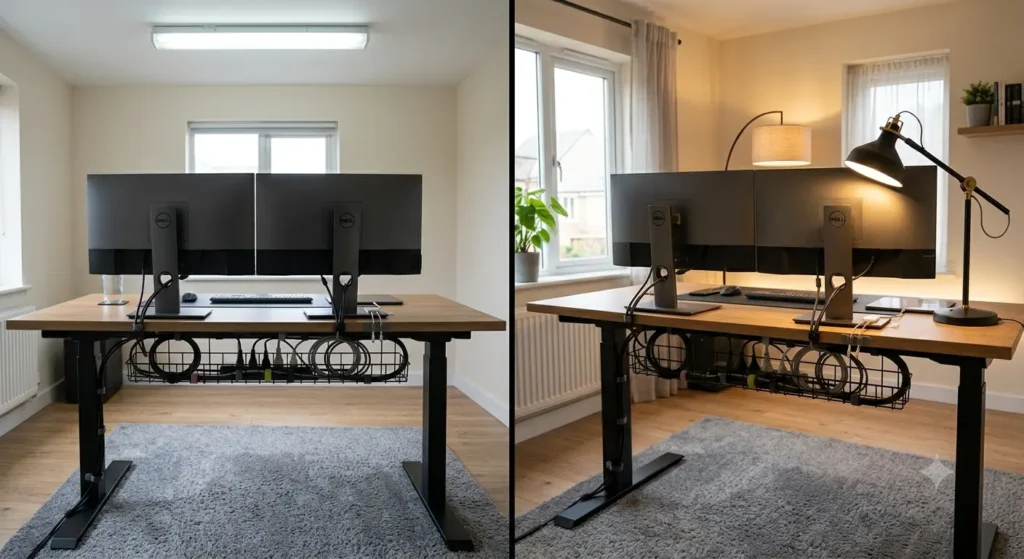
- Why people make this mistake: By default, overhead lights or whatever is in the room are often used.
- Why it causes problems: Bad lighting can make video calls look awkward and make you tired of looking at them.
- Simple solution: Add a desk lamp with adjustable brightness, and position your desk near a window when possible without facing directly into the glare.
- Best practice: You should use both general room lighting and a task lamp pointed at your desk.
- Common misconception: Being brighter is always better. You should keep your eyes away from bright lights and glare as much as possible.
6. Working Without Proper Desk Organization
- Why people make this mistake: Papers, chargers, and mail just pile up when there isn’t a method in place.
- Why it causes problems: You can’t concentrate during the day if your work is a mess because you can’t find things quickly.
- Simple solution: Use small trays or organizers to give recurring items; chargers, notebooks, pens, a fixed home.
- Best practice: A five-minute end-of-day reset keeps clutter from accumulating in the first place. Check out Desk Organization Ideas for setups that actually stick.
- Common misconception: Organization is about looking neat. Really, it’s about reducing daily friction and small time drains.
7. Ignoring Cable Management
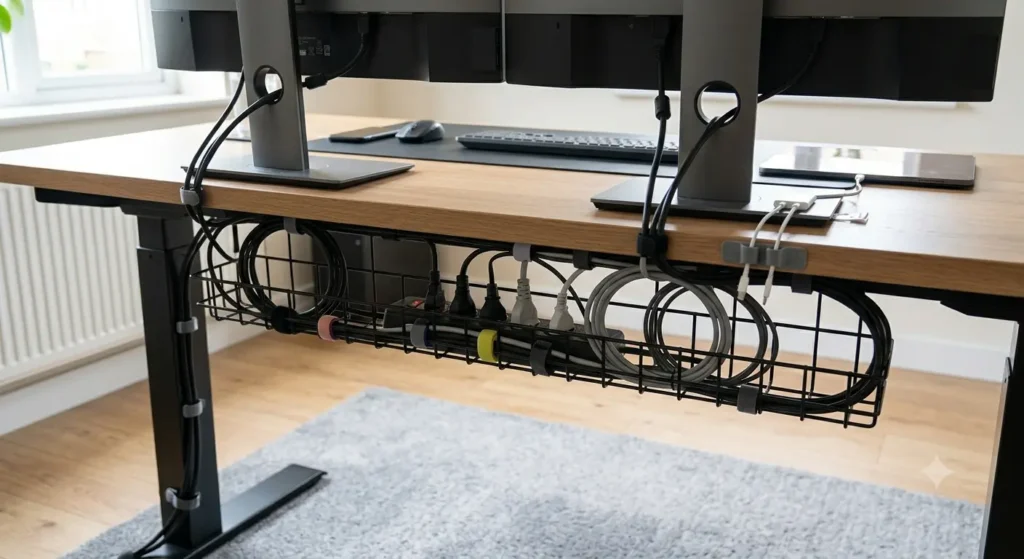
- Why people make this mistake: The number of cables for the monitor, charger, mouse, computer, and webcam grows quickly, and it’s annoying to deal with all of them.
- Why it causes problems: Cables that are tangled up look bad, put you at risk of tripping, and make it hard to clean or rearrange your desk.
- Simple solution: To keep everything in order, use simple cable clips or a cable tray under your desk.
- Best practice: If you often unplug and plug things back in, organize the cables by device and label them. There are useful setups in our Cable Management Tips book that cost less than $20.
- Common misconception: Managing cables is only for looks. As well as being a real safety problem, it needs to be fixed.
8. Not Separating Work and Personal Space
- Why people make this mistake: When you don’t have a lot of space, like in an apartment, it seems impossible to have a separate office.
- Why it causes problems: Setting a limit can help you “clock out,” but not if you don’t. This can make you work late or on the weekends.
- Simple solution: Even a room divider, a specific corner, or the simple act of closing a laptop and putting it in a drawer can create separation.
- Best practice: If you can’t find a different room, set up a “work zone” that you will only use for work.
- Common misconception: People think you need an entire spare room to create separation. A defined zone works too.
9. Too Much Clutter
- Why people make this mistake: Everything that doesn’t have a clear place to go in the house ends up on desks.
- Why it causes problems: It’s amazing how visual clutter can make you feel more stressed and make your office look jumbled, even if you don’t have a lot of work to do.
- Simple solution: Do a full desk clear-out monthly and only put back what you use weekly.
- Best practice: Keep your desktop to just what you need for that day’s tasks; everything else goes in a drawer or shelf.
- Common misconception: A “lived-in” desk equals a productive one. Usually it’s the opposite.
10. Poor Internet Setup
- Why people make this mistake: Most people think that Wi-Fi works the same in all parts of the house.
- Why it causes problems: If you have a weak signal in your office, calls will go through, files will be slow, and talks will drag on for a long time.
- Simple solution: Not just anywhere in the house, but at your work, do a quick speed test.
- Best practice: A mesh Wi-Fi extension or a direct Ethernet link can fix most weak-signal problems for a low cost.
- Common misconception: An increase in bandwidth is thought to always get rid of lag. Often, the real problem is with the signal strength or where the router is placed.
11. Skipping Regular Movement Breaks
- Why people make this mistake: When you’re deeply focused, time seems to fly by, and getting up feels like you’re stopping the flow.
- Why it causes problems: Sitting still for long periods of time can make you stiff, tired, and hurt your circulation.
- Simple solution: Set a simple timer to stand, stretch, or walk for a couple of minutes every hour.
- Best practice: General advice from places like the Mayo Clinic says to break up long times of sitting with short breaks throughout the day.
- Common misconception: Breaks are seen as a bad thing by some. In real life, small breaks tend to help people stay focused instead of getting in the way.
12. Buying Too Many Gadgets Instead of Essentials
- Why people make this mistake: It’s simple to get sucked into buying cool work gadgets before getting the basics right.
- Why it causes problems: A good chair or monitor height are basic needs that aren’t met, but money and work space are wasted on extras.
- Simple solution: Start with the basics, like the chair, the height of the computer, the lights, and the internet, and then add on the extras.
- Best practice: Make a short list of the really important things you need and check them off before you look at gadgets. If a standing desk is on your radar, it’s worth prioritizing over smaller accessories.
- Common misconception: More gear automatically means a better setup. A lot of extras doesn’t always work better than a few well-chosen things.
Common Home Office Mistakes, Their Impact, and Fixes
| Mistake | Impact | Recommended Fix |
| Ignoring ergonomics | Neck, back, and wrist strain | Adjust screen height, elbow angle, and seat position |
| Using dining table permanently | Poor posture, discomfort | Add seat cushion or invest in a basic desk |
| Cheapest chair | Lower back pain over time | Choose adjustable height and lumbar support |
| Poor monitor position | Neck strain, headaches | Raise screen to eye level with a stand |
| Bad lighting | Eye strain, poor video quality | Add layered task and ambient lighting |
| No desk organization | Lost time, distraction | Use trays and daily reset habits |
| Ignored cable management | Clutter, trip hazards | Use cable clips or under-desk trays |
| No work/personal separation | Difficulty unplugging | Define a specific work zone |
| Excess clutter | Increased stress, distraction | Monthly desk clear-outs |
| Poor internet setup | Dropped calls, lag | Wired connection or mesh extender |
| Skipping movement breaks | Stiffness, fatigue | Hourly stand-and-stretch reminders |
| Too many gadgets | Wasted budget and space | Prioritize essentials first |
Quick Ergonomic Desk Setup Table
| Element | Recommended Position |
| Monitor top | At or slightly below eye level |
| Monitor distance | About an arm’s length away |
| Elbows | Roughly 90-degree angle |
| Feet | Flat on the floor or footrest |
| Wrists | Neutral, not bent up or down |
| Chair lumbar support | Supports natural lower back curve |
Quick Checklist Before You Finish Your Home Office
| Task | Done? |
| Monitor at eye level | ☐ |
| Chair has lumbar support | ☐ |
| Cables organized and secured | ☐ |
| Lighting layered (ambient + task) | ☐ |
| Desk cleared of non-work items | ☐ |
| Internet speed tested at desk | ☐ |
| Work zone separated from personal space | ☐ |
| Movement break reminder set | ☐ |
Common Mistake: Assuming a great-looking setup is automatically an ergonomic one. Aesthetics and function aren’t the same thing.
Final Thoughts
None of this requires an overnight overhaul. If you take away one thing from this guide on home office setup mistakes to avoid, let it be this: pick one issue from the list above and fix it this week. Maybe it’s raising your monitor. Maybe it’s finally dealing with that cable jungle under your desk.
Small, consistent adjustments compound over time; just like the bad habits that caused the problems in the first place. Your future self, and your neck, will thank you.
Ready to go deeper? Check out our Remote Work Essentials for Beginners guide, or browse our Standing Desk Buying Guide if you’re ready for your next upgrade.
Disclaimer : This post contains affiliate links. This means we may earn a commission should you chose to sign up for a program or make a purchase using these links. There is no added cost to you but your purchase through these links helps support our content. Check out our disclaimer and disclosure page for more details.
FAQs
What is the biggest home office setup mistake?
Ignoring ergonomics is generally considered the biggest mistake, since poor posture habits compound over weeks and months.
How should a monitor be positioned?
The top of the screen should sit at or slightly below eye level, roughly an arm’s length from where you sit.
Do I really need an ergonomic chair?
Not necessarily an expensive one, but adjustable height and some lumbar support make a noticeable difference over full workdays.
Can I work from a dining table?
Short-term, yes with a cushion to adjust height. Long-term, a dedicated desk setup is usually more comfortable.
How much lighting is ideal?
A mix of natural light and an adjustable task lamp tends to reduce eye strain better than a single overhead source.
How often should I stand up?
Standing and moving briefly roughly once an hour is a commonly recommended guideline for breaking up long sitting periods.
Is a standing desk necessary?
It’s optional, not required; many people do fine with a well-positioned seated setup and regular movement breaks.
What’s the easiest fix to start with?
Adjusting your monitor height is usually the fastest, cheapest change with the most noticeable impact.

Hi, I am Jiyauddin. Freelance veteran with 20+ years of experience across computer operations, graphic design, and digital marketing. At GearForRemote.com, I share actionable guides, tech reviews, and proven workflows to help remote workers elevate their digital productivity.